Tuesday, February 12, 2019

Top 6 Ways to Check iPhone for Virus or Malware 2019


1#: Top 6 Ways to Check iPhone for Virus or Malware

Malware does exist in iPhone and if you are sure that your device is misbehaving, you should definitely check your iPhone for viruses or malware. If you are thinking how to check iPhone for virus or malware, you can follow the methods given below.
1.Check Battery Performance

Viruses are harmful programs that run in the background. They drain the battery of your iPhone very quickly. So, you need to check the battery performance of your iPhone.

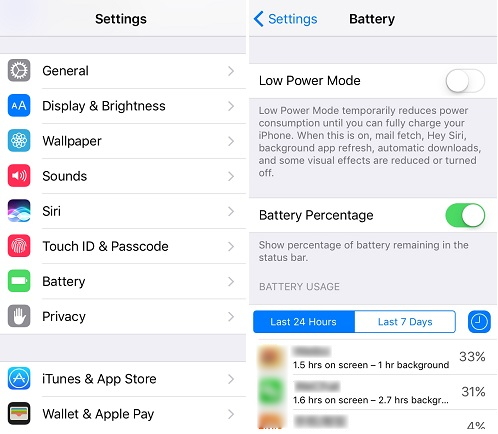
Step 1. Go to Settings and tap on Battery.

Step 2. All the apps with the respective battery usage will be listed.

Step 3. When you tap on Show Detailed Usage, you will get the breakdown of foreground and background usage. If you find an app that you don’t recognize, remove it immediately.


2.Check whether Your iPhone is JailBroken

In the jailbroken iPhone, all the in-built restrictions are removed, making it vulnerable to harmful app installations. Follow the steps given below to check if your iPhone is jailbroken.

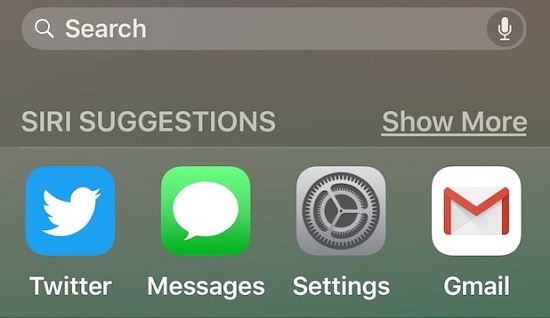
Step 1. Open the Search bar in your device.

Step 2. Enter cydia in the search bar and tap Search. If you find Cydia in your iPhone, your device is jailbroken.


3.Check Crashing Apps

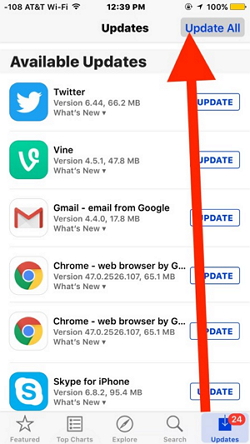
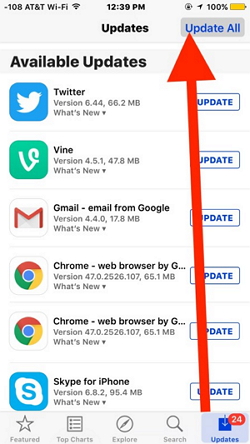
If the apps that you regularly use are suddenly crashing, your device’s privacy has been compromised. Keep all the apps updated to the latest and secure version. Follow the steps below to update the apps.

Step 1. Open App Store on your device.

Step 2. If asked, enter the Apple ID and password.

Step 3. If there are any updates available, tap Update All.


4.Check Unknown Apps

The malicious apps look similar to the original apps so you need to be extra careful while checking for unknown apps.

Step 1. Swipe through the screen and look for the apps that you don’t remember installing.

Step 2. If you find an app that looks suspicious, delete it immediately.

Step 3. To see the list of apps that are installed from App Store, tap the Apps icon -> your profile photo -> Purchased. If you have an app on iPhone that doesn’t belong to this list, it is malicious.


5.Check Pop-up Ads in Safari

When there is a sudden surge in the pop-up ads, your device is definitely infected. To be safe, don’t click any of the pop-up ads.


6.Check Unexplained Extra Charges

Viruses use your phone’s data to access the internet and always run in the background. Keep checking your bill statements to ensure that there is no sudden surge in your data usage or messages.
2#: 5 Things to Do after Checking iPhone for Virus/Malware

After checking all the steps above, if you find something suspicious or unknown apps, you need to take actions on this situation.
1.Turn off & Restart your Device

Step 1. Hold down the power button of your device until you see a slider.

Step 2. Slide and turn the iPhone off.

Step 3. To restart, hold down the power button until you see the Apple logo.


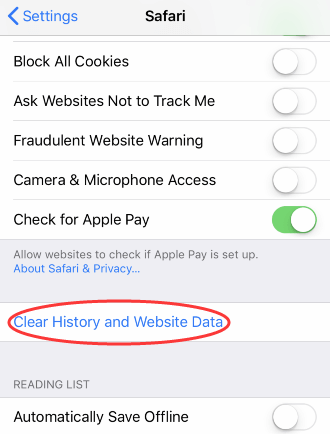
2.Clear History & Website Data

Step 1. Open Settings on your device and tap Safari.

Step 2. Again tap Clear History and Website Data.

Step 3. Confirm by tapping Clear History and Data.


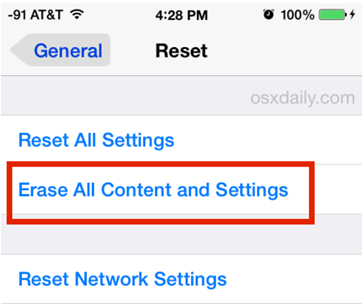
3.Reset Your iPhone as a New One

If nothing works, you need to factory reset your iPhone.

Step 1. Go to Settings -> General -> Reset -> Erase All Contents and Settings.

Step 2. Enter your passcode to confirm the reset.

Step 3. The process will take some time to complete. Then set up your device as a new one.


4.Restore your iPhone from Backup

You can also restore the backup to your device to remove the viruses. You can restore either the iTunes backup or iCloud backup to your iPhone. If the most recent backup is corrupted and if for any reason you are not able to restore, it might contain malware. So, restore one of other backups to your device.


Sponsor ads:

Gihosoft Free iPhone Data Recovery:iphonerecovery.com

Free iPhone Data Recovery Software for Windows/Mac

Recover up to 12+ types of files, including contacts, SMS, photos, WhatsApp, Viber, notes, etc.

Restore lost data from iOS devices directly or from iTunes and iCloud backup

Recover iPhone data lost due to iOS upgrade/jailbreak, accidental deletion, device lost or broken

Support all the latest iPhone, iPad and iPod Touch

Both Free and Pro version.

If you lost data after you updated to a new iPhone, you can always use Gihosoft iPhone Data Recovery to get the data back from the old iPhone or backup.

Top 10 Best FRP Bypass Tools to Bypass Google Account on Android Device 2019

Worth reading:download youtube 1080p

If you use android phones, please choose Gihosoft Android Data Recovery


Jihosoft Android Data Recovery: the best Android Data Recovery software for Windows and Mac to recover deleted contacts, messages, photos, videos, WhatsApp and etc from Android

How to Fix iPhone X Bricked with Black Screen?


How to Fix iPhone X Bricked with Black Screen?
In this section, you will know about effective ways that can be used to deal with the situation. Majority of the solutions would be either free or affordable for you.
Tip 1. Force Restart iPhone X While Charging
This is what we can try first to deal with most software problems on iPhone X at once. You should ensure that your phone starts appropriately. To use the technique, you can follow the steps below.

Connect your iPhone X with the original charger and keep it intact for a while.

Force restart your phone by holding the volume up button. Release it immediately. Repeat the same process with the volume down button. Press the lock button and hold it for a while. Release it immediately when Apple logo appears.


Tip 2. Update Software Version of iPhone X

Update software version is usually available to fix almost all the problems, errors, and bugs, and improving the entire performance. Your iPhone is not working because you have ignored the software update condition for a long time. It causes a glitch in your iPhone software system. You can follow the steps below to ensure that your iPhone X has been updated appropriately.


Open the settings on your iPhone and go to the general section. Choose a software update.


Click download and install button on the screen below. Enter, if the iPhone asks for a password.


Agree with the terms and conditions of the system, which will start the downloading process.


Now you just have to wait for the downloading process to end.


Tip 3. Fix iPhone X Bricked By Restoring iPhone with iTunes

If any of the solution mentioned about fails to work, you can try restoring your device. This method, however, can erase all of your data. You can follow the instructions below to ensure success.


Get the updated iTunes on a system and open it.


Connect your iPhone using the original Apple USB cable.


Soon, perhaps after 5 to 10 mins, iTunes would recognise your iPhone version. You will be asked to choose either update or restore options. Go for restore.


This will help you in erasing all the critical data from your iPhone, but it will solve all your bricking problem.


In conclusion, there are many options we can use to solve all your problems concerning iPhone X black screen issue. The first aspect observed in this was force restart while charging. Even though this can be useful and easiest way, it doesn't ensure success for everyone. The second step observed was the utilisation of Fixppo application. It is personally the most effective methodology you can use for fixing your iPhone without losing any data.

Sponsor ads:

Gihosoft Free iPhone Data Recovery:iphonerecovery.com

Free iPhone Data Recovery Software for Windows/Mac

Recover up to 12+ types of files, including contacts, SMS, photos, WhatsApp, Viber, notes, etc.

Restore lost data from iOS devices directly or from iTunes and iCloud backup

Recover iPhone data lost due to iOS upgrade/jailbreak, accidental deletion, device lost or broken

Support all the latest iPhone, iPad and iPod Touch

Both Free and Pro version.

If you lost data after you updated to a new iPhone, you can always use Gihosoft iPhone Data Recovery to get the data back from the old iPhone or backup.

Top 10 Best FRP Bypass Tools to Bypass Google Account on Android Device 2019

Worth reading:download youtube 1080p

If you use android phones, please choose Gihosoft Android Data Recovery

Jihosoft Android Data Recovery: the best Android Data Recovery software for Windows and Mac to recover deleted contacts, messages, photos, videos, WhatsApp and etc from Android

Friday, February 1, 2019

How to Download Music from YouTube to iTunes 2019


How to Download Music from YouTube to iTunes 2019

Nevertheless, without any doubts, there is always a right solution to the corresponding problem! A most appropriate tool – Tunes Rebuilder, is especially designed to let you get free music in iTunes - free download songs from YouTube to iTunes. Then how to download songs from YouTube to iTunes exactly? Now, Tunes Rebuilder tells you!

Tunes Rebuilder owns the enhanced features; it is as your personal music source and benefits you from getting free music from YouTube to iTunes in one step. Download it now and enjoy free music immediately!

Step 1. Launch the Program

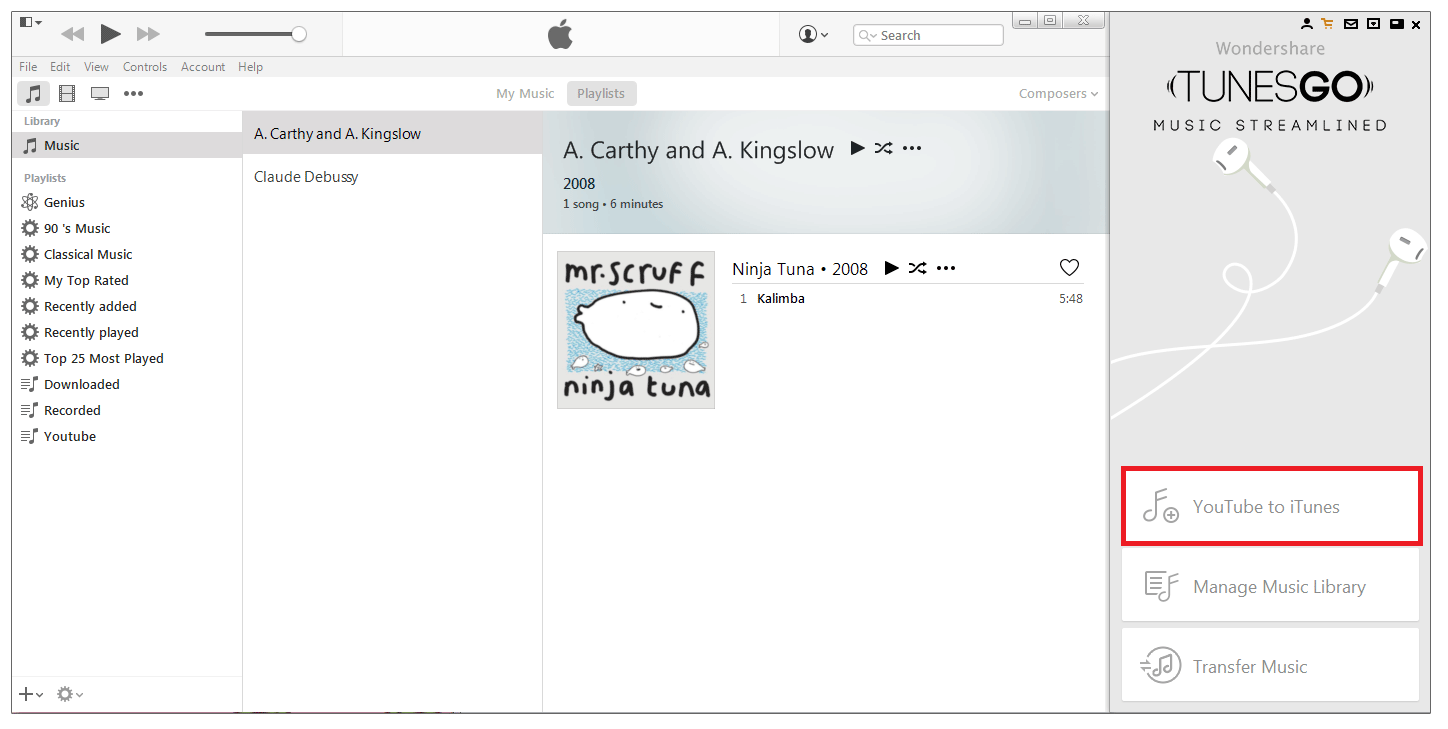
Launch the program, and switch Tunes Rebuilder interface to iTunes with Tunes Rebuilder taskbar beside by clicking the upper right last 4th button.


Step 2. Search Music on YouTube

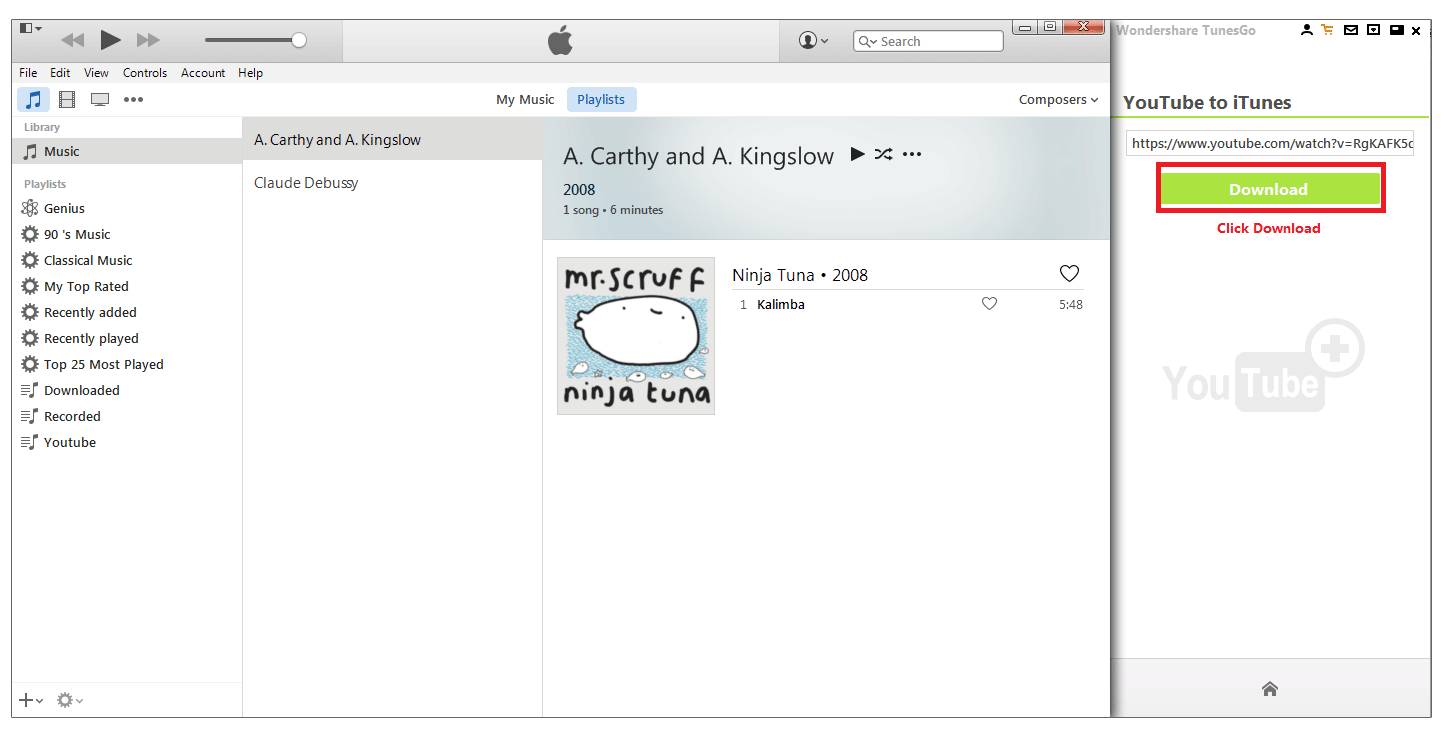
Select "YouTube to iTunes". And then search your target music on YouTube from web browser and copy the music link. Thus, when you back to the program, the music link will be automatically pasted to the blank under "YouTube to iTunes".


Step 3. Free Download Songs from YouTube to iTunes

Click Download to start downloading. After the download is done, the music will be automatically converted to MP3, added music tags and album artwork, and added to “YouTube Downloads” playlist in iTunes.Sponsor ads:

Gihosoft Free iPhone Data Recovery:https://www.gihosoft.com/iphone-data-recovery-free.html

Gihosoft iPhone Data Recovery Free

Free iPhone Data Recovery Software for Windows/Mac

Recover up to 12+ types of files, including contacts, SMS, photos, WhatsApp, Viber, notes, etc.

Restore lost data from iOS devices directly or from iTunes and iCloud backup

Recover iPhone data lost due to iOS upgrade/jailbreak, accidental deletion, device lost or broken

Support all the latest iPhone, iPad and iPod Touch

Both Free and Pro version.

If you lost data after you updated to a new iPhone, you can always use Gihosoft iPhone Data Recovery to get the data back from the old iPhone or backup.You may also like: iphonerecovery.com

If you use android phones, please choose Gihosoft Android Data Recovery.

With Gihosoft Android Data Recovery, no longer afraid of data loss!

Must read:Youtube video downloader for pc

Gihosoft RePicvid Free Photo Recovery Software provides a free photo recovery software for windows to help users recover the deleted or lost photo for free.

Jihosoft Android Data Recovery: the best Android Data Recovery software for Windows and Mac to recover deleted contacts, messages, photos, videos, WhatsApp and etc from Android devices.Tips:How to transfer messages from iPhone to iPhone

jihosoft Free iPhone Data Recovery

Sunday, January 27, 2019

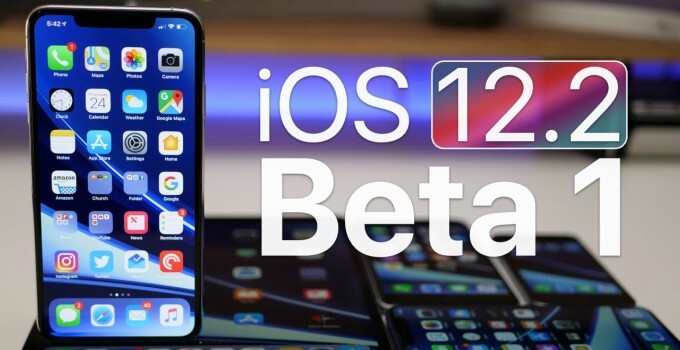
Download iOS 12.2 Developer Beta 1 without developer account


WHAT’S NEW IN IOS 12.2 BETA 1?

iOS 12.2 Beta 1 carries the build number 16E5181f and weighs around 750MB on all compatible Apple devices.

It brings quite a lot of bug fixes and some minor user interface enhancements, namely –


Apple News for Canada – Apple News is now available for Canadian users for the very first time. News sources are available in two languages – English and French.


HealthKit – High/low heart rate notifications along with irregular heart rhythm notifications are now available as read-only category sample types.


Safari HTTPS update – Websites that don’t have an SSL certificate are now labeled “Not Secure” in the menu bar.


Air Quality in Apple Maps – Apple Maps now lets you display Air Quality alongside weather news. It can be activated in the Maps section of the Settings app.


You can grab this update straight from the downloads section of the Apple Developer Center. Users who aren’t enrolled in Apple’s developer program can download this update using the OTA Profile download link below.
IOS 12.2 BETA 1 DOWNLOAD
OTA PROFILE


Download
IPHONE


iPhone SE, iPhone 5s


iPhone 6s, iPhone 6


iPhone 6s Plus, iPhone 6 Plus


iPhone 8, iPhone 7


iPhone 8 Plus, iPhone 7 Plus


iPhone X


iPhone XS


iPhone XS Max


iPhone XR
IPAD


iPad Air, iPad mini 2


iPad mini 4, iPad Air 2, iPad mini 3


iPad (5th generation), iPad (6th generation)


iPad Pro (9.7‑inch)


iPad Pro (12.9‑inch)


iPad Pro (10.5-inch), iPad Pro (12.9-inch) (2nd generation)


iPad Pro (11-inch), iPad Pro (12.9-inch) (3rd generation)
IPOD


iPod touch (6th generation)
SHOULD YOU UPDATE?

iOS 12.2 will most likely be the final major version of iOS 12, so we definitely recommend updating your device to the latest version. The upcoming beta updates will flesh this version out even more.

Just like previous updates, there’s nothing of interest here for jailbreak enthusiasts.

As mentioned in our latest firmware update tweet, users who are interested in jailbreaking their devices should move back to iOS 12.1.1 and stay there.

Sponsor ads:

Gihosoft Free iPhone Data Recovery:iphonerecovery.com

Free iPhone Data Recovery Software for Windows/Mac

Recover up to 12+ types of files, including contacts, SMS, photos, WhatsApp, Viber, notes, etc.

Restore lost data from iOS devices directly or from iTunes and iCloud backup

Recover iPhone data lost due to iOS upgrade/jailbreak, accidental deletion, device lost or broken

Support all the latest iPhone, iPad and iPod Touch

Both Free and Pro version.

If you lost data after you updated to a new iPhone, you can always use Gihosoft iPhone Data Recovery to get the data back from the old iPhone or backup.

Top 10 Best FRP Bypass Tools to Bypass Google Account on Android Device 2019

Worth reading:download youtube 1080p

Jihosoft Android Data Recovery: the best Android Data Recovery software for Windows and Mac to recover deleted contacts, messages, photos, videos, WhatsApp and etc from Android


If you use android phones, please choose Gihosoft Android Data Recovery.

Friday, January 25, 2019

How to Downgrade iOS 12.1.3 – iOS 12.1.2 to iOS 12.1.1 for Potential iOS 12.1.1 Jailbreak 2019


A Chinese security researcher recently detailed Chaos exploit for iOS 12.1.1 and lower that will work on all non-A12 devices like the iPhone X, iPhone 8, and iPhone 7. While he did not release the exploit code, it has given hopes to the jailbreak community of a possible iOS 12 – iOS 12.1 jailbreak tool being on the horizon. So, if you have already updated to iOS 12.1.3, it is strongly recommended that you downgrade back to iOS 12.1.1 – iOS 12.1.2 if you want to jailbreak your iPhone or iPad.

Right now, it is unclear if the Chaos exploit works with iOS 12.1.2 or not. Thus, it is recommended that you downgrade back to iOS 12.1.1 to be on the safe side. Apple is still signing iOS 12.1.1 and iOS 12.1.2 but with iOS 12.1.3 released, I expect the iOS 12.1.1 signing window to close within the next 24-48 hours.
Pre-requisites

There are two different ways for you to downgrade your iPhone or iPad to iOS 12.1.1 from iOS 12.1.3 – iOS 12.1.2. One of them will retain your user data, while the other will wipe your device completely clean. Irrespective of which method you follow, make sure to first check that Apple is signing the firmware file. Open this page and ensure that there are green rows with a tick which means that Apple is still signing that particular firmware. In this case, you need to ensure there is a green tick for the iOS 12.1.1 firmware file.
Method 1

The riskier method of the two but you can downgrade back to iOS 12.1 with this process without wiping your device clean. This makes it notably faster than the second method which involves wiping clean your iPhone or iPad.
How to Downgrade iOS 12.1.3 – iOS 12.1.2 to iOS 12.1.1 Without Losing Data


Turn off Find my iPhone via the Settings app (Settings > iCloud > Find my iPhone).


Download the iOS 12.1.1 firmware file for your device from our iOS firmware file download page for your iPhone or iPad.


iOS firmware file for iPhone


iOS firmware file for iPad

Note: If you’re downloading the firmware file using Safari then ensure that auto unzip feature is disabled or use Chrome or Firefox. Alternatively, renaming the .zip file as .ipsw file should also work.


Connect the iOS device running iOS 12.1.3 – iOS 12.1.2 to your computer.


Launch iTunes and select the iOS device from the top left corner.


Then click on Summary in the left-hand sidebar.


Hold the Alt/Option key on the Mac or Shift Key in Windows on your keyboard and click on the Check for Update option, instead of restoring.


Select the iOS 12.1.1 IPSW firmware file you had downloaded earlier.


iTunes will inform that it will update your iOS device to iOS 12.1 and will verify the update with Apple.


Click Update.


iTunes should now downgrade your iOS device to iOS 12.1.1.
Method 2

A safer method but it takes more time since you will have to erase your iPhone completely. You will also have to ensure that you already have an iOS 12.1 backup since you cannot restore your iOS 12.1.1 backup on your iPhone or iPad after the downgrade. If you don’t have an older backup, you won’t be able to restore your iPhone after downgrading it back to iOS 12.1.
How to Downgrade from iOS 12.1.3 – iOS 12.1.2 to iOS 12.1.1


Download the iOS 12.1.1 firmware file for your device from our download page.


iOS firmware file for iPhone


iOS firmware file for iPad

Note: If you’re downloading the firmware file using Safari then ensure that auto unzip feature is disabled or use Chrome or Firefox. Alternatively, renaming the .zip file as .ipsw file should also work.


You now need to put your device in DFU mode (if you want to find out what it means check this post for more details):


Plug your device into your computer.


Turn off the device by holding the Sleep/Wake or Power button and swiping it off.


Hold the power button for 3 seconds.


Begin holding the Home button without releasing the Sleep/Power button for 10 seconds.


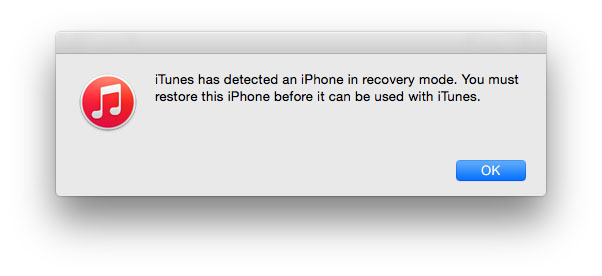
Release the power button and continue holding the home button until you get a popup from iTunes that it has detected that your device is in Recovery mode.


Click on the Ok button.


Hold the Alt/Option key on the Mac or Shift key in Windows on your keyboard and click on the Restore iPhone… (iPad/iPod touch…) button. Note: If you directly click on the Restore iPhone button without holding the Alt/Option key on the Mac or Shift key in Windows will result in restoring your device back to iOS 12.1.3, which is the latest version.


Select the iOS 12.1.1 IPSW file you had downloaded earlier.


Then click on the Restore and Update button to continue.


In the next screen, it will give you information about the iOS 12.1 update. Click on the Next button, followed by the Agree button to continue.


iTunes will now verify the software and install it on your device. It should take around 10 minutes.


After it is successfully restored to iOS 12.1.1, you should see the white ‘Hello’ screen. Follow the on-screen instructions to set up your device, and restore your device from the archived backup you had made to restore your personal data.

That’s it. Your iPhone or iPad should have been successfully downgraded from iOS 12.1.3 – iOS 12.1.2 to iOS 12.1.1.
Troubleshooting Tips

If you get the error message “This device isn’t eligible for the requested build” then it is probably because you’ve downloaded the wrong firmware file for your device.

Please don’t forget to let us know how it goes in the comments and drop us a line if you any questions or need any help.

Sponsor ads:

Gihosoft Free iPhone Data Recovery:iphonerecovery.com

Free iPhone Data Recovery Software for Windows/Mac

Recover up to 12+ types of files, including contacts, SMS, photos, WhatsApp, Viber, notes, etc.

Restore lost data from iOS devices directly or from iTunes and iCloud backup

Recover iPhone data lost due to iOS upgrade/jailbreak, accidental deletion, device lost or broken

Support all the latest iPhone, iPad and iPod Touch

Both Free and Pro version.

If you lost data after you updated to a new iPhone, you can always use Gihosoft iPhone Data Recovery to get the data back from the old iPhone or backup.

Top 10 Best FRP Bypass Tools to Bypass Google Account on Android Device 2019

Worth reading:download youtube 1080p

Jihosoft Android Data Recovery: the best Android Data Recovery software for Windows and Mac to recover deleted contacts, messages, photos, videos, WhatsApp and etc from Android


If you use android phones, please choose Gihosoft Android Data Recovery.

Thursday, January 24, 2019

10 Best And Free Music Player Apps For Windows [2019 Edition]


People who have spent a lot of money to curate their music collection are always in search of a best and free music player software for their PC. That’s because these audio player apps allow audiophiles to listen to their favorite songs whenever they want and help them organize their library in a better manner.


When we talk about Windows 10, there are many free mp3 software available for 2019. However, many old-school music players are out of the picture. If you can recall, I am talking about the long gone free music manager software went by the name Winamp.


On the other hand, Microsoft’s home-baked software, Windows Media Player has been replaced by newer music apps. Although, the former default mp3 music player for Windows still exists as a free optional feature in Windows 10.


The realm of free music apps for PC might be fading away with time, but still, there are many people who consider local solutions over their internet-based audio streaming counterparts. So, wasting any more time, let’s see 2019’s some best free music player software for Windows 10.


Note: We have curated the list of some of the apps for Windows 10 and older versions. Please note that the names aren’t mentioned in any order of preference.


Best Linux Music Players That Every User Must Try


Free And Best Android Music Players


Best Radio Apps For Android To Stream Online Music

10 Best Free Music Player Software for Windows


1. Dopamine


After the speedy installation process of Dopamine completes, what you get to look and feel is enough to put it amongst other best and free music player apps. The open source Windows Media player alternative appears to be a Microsoft-made UWP app, contrary to the fact that it isn’t, and it not available in the Store either.


The things users would like about this popular music app for Windows is the easy to navigate interface, not to mention, the fluidity. All the options and settings are placed in a way that users don’t need to strain their eyes to find them. There are a number of customizations that can be done to improve Dopamine’s interface.


Dopamine supports a vast number of audio formats including MP4, WMA, OGG, FLAC, M4A, AAC, WAV, APE, and OPUS. This music playing app might fall behind a little regarding feature set, but users can take advantage of various things like automatic meta tagging, displaying lyrics in real-time, last.fm scrobbling, etc. Some of Dopamine’s features require the users to run Windows 10 on their computer.


Supported Platforms: Windows


Download Dopamine


2. MusicBee


It is another well-known name in our list of the recommended music player software for Windows. MusicBee is nearly a decade old and works on Windows 7 and later version of Microsoft’s OS.


As soon as you start using the music player, you’ll immediately start appreciating its neat and clean user interface which is complemented by the color combination.


The creators of this free music player have made it easier for people who want to make a switch. MusicBee can easily import your iTunes and Music library. It comes with support for various audio formats, including MP3, AAC, WMA, WAV, M4A, FLAC, OGG, APE, TAK, etc.


This audio player can sync your songs with Android phones, some iOS devices, USB drives, and other portable music players. It can also keep an eye on your hard drive for changes and update the music library automatically.


You can customize MusicBee with a number of skins and plugins (also supports some Winamp plugins). MusicBee’s list of features includes support for 15-band equalizer, DSP effects, CD ripping, automatic metadata import, etc.


MusicBee and doesn’t consume much space on your hard drive. It can be installed on Windows just like any other software. But the free music player is also available as a portable version. Moreover, a UWP version of the music player is also available in Store.


Supported Platforms: Windows


Download MusicBee


3. Clementine


The open source Clementine, fork of another music player known as Amarok, is also one of the best free music players for Windows 10.


Clementine might not be as good looking as MusicBee, but it offers some serious library management to its users. There is a built-in file manager and the music player easily find audio content in lots of online services like SoundCloud, RockRadio, RadioTunes, etc. You can also configure Clementine to access your music stored on cloud drives, including Box, Dropbox, Google Drive, OneDrive, Amazon Cloud Drive, etc.


The free music player software comes with all the standard features including equalizer and support for different formats. What’s more is that you can use your Android device as a remote control for Clementine.


Supported Platforms: Windows, macOS, Linux


Download Clementine


4. foobar2000


Since its inception, foobar2000 has generated a cult following. Modular design of this simple music player for Windows makes it easier to add new features and components to the free music player.


Foobar2000 desktop app is available for Windows XP and later versions; it also offers portable installation. You can find this music software as a UWP app for Windows 10 and above. Foobar2000 apps are available for Android and iOS as well.


In the first look, the interface is more minimalistic than any other audio app for PC out there. Some users might not like it, because, 2019 is here and people might not want to see a music player that appears to be designed for Windows 98. But as it’s said, don’t judge a book by its cover.


FooBar2000 can play a range of audio formats, including MP3, AAC, WMA, OGG, FLAC, WAV, Opus, Speex, etc. It supports automatic meta import, CD ripping, and it can access compressed archives like ZIP, GZIP, 7z, etc. Then come the numerous keyboard shortcuts which you can customize at your will.


Supported Platforms: Windows, Android, iOS


Download Foobar2000


5. AIMP


Hearing about AIMP gives a quick reminder of the great image editing software called GIMP. But this music player for Windows has no ties with GIMP which was developed by the GNU Project. In fact, AIMP, short for Artem Izmaylov, is named after its creator who released the first version in 2006.


For those people who consider visual appearance as a deal breaker, AIMP is one of the top-rated music player in that sector. This player can do a lot more than playing songs stored on the hard drive.


AIMP provides a good looking interface for organizing your song library, creating custom and smart playlists, rips CDs, manage meta tags, change player skins, etc.


If you’re in search of a player for PC with equalizer, AIMP can be a choice worth considering. This is shipped with an 18-band equalizer and a variety of sound effects to listen to the music as you like. A couple of things users would find convenient is the detachable playlist section and the ability to change the theme with a single click.


Regarding audio formats, this audio player for Windows supports almost every popular audio format out there. Also, there is a built-in audio converter, sleep timer, and an alarm clock feature which even wakes a PC from sleep mode.


Supported Platforms: Windows, Android


Download AIMP


6. MediaMonkey


Another free music player software that can help you unclutter your messy collection is MediaMonkey. In the first appearance, it looks like a redesigned version of WMP but with way more features.


Besides playing numerous audio formats, this Microsoft Windows Media Player alternative can automatically tag audio files, help you sync files with devices, stream audio over your network, rip CDs, burn music to DVDs and CDs, convert audio format, manage volume automatically, and much more. This audio player for Windows has a dedicated jukebox which can help users fuel a party with their own music collection while preventing the library from being modified.


MediaMonkey is primarily a music app for Windows, but it’s also available in the form of Android and iOS apps that act as a wireless remote control. There is a premium version of the free music player called MediaMonkey Gold which a way to get for an extra set of features.


Supported Platforms: Windows


Download MediaMonkey


7. VLC


VLC already tops the list of the best music software for Windows of 2019, but the open source software has the capabilities to handle people’s music needs.


With VLC, users can easily create song playlist out of there local music collection and also stream it over their network. It also houses a number of online radio services which the users can access at their fingertips. The built-in equalizer is complemented by other advanced audio management feature which VLC is already known for.


Why people love VLC is because it can play almost every audio and video format that exists. The availability of apps for almost every popular platform makes VLC one of the best free music player software.


Supported Platforms: Windows, macOS, Linux, Android, Chrome OS, Apple TV, Windows Phone.


Download VLC


8. iTunes


Do I need to tell you about iTunes? Probably, the answer would be no. Other than being a bridge between iOS devices and computers, iTunes is also one of the best free music players software for Windows as well. A reason why you can prefer iTunes this single music player can solve different types of music needs but the bulkiness of this music player might compel some users to take a step back.


iTunes can play your locally stored music, and it can play the music you bought on the iTunes music store. And if you have subscribed to Apple Music, the free music player triples as an online music streaming app for Windows.


iTunes supports popular audio formats, including MP3, WAV, AIFF, Apple Lossless, and AAC. It also provides an easy way to manage your songs in the library. Other than playing songs on your PC, you can also stream them to other devices on your local network using a feature called home sharing.


Standard music player features in iTunes include the equalizer, optional compact mode, metadata import, etc. Another advantage that makes iTunes a considerable choice is that Apple backs it. So, updates and new features are added at regular intervals.


Supported Platforms: Windows, macOS, Android


Download Apple Music


9. Windows Media Player


The simplicity and ease of use offered by WMP still make it one of the best and free audio player software for Windows OS, even on Windows 10.


If you don’t like the default look of the player, there are many custom skins for WMP. You’ll easily recognize what the music player has become as you would be able to see those visualizations while playing music.


WMP has got your back when it comes to playing different audio file formats, and it can also play some video formats and image formats. You can efficiently manage your songs library, create playlists, rip music, burn your music collection, etc.


The free music player can also import metadata from the internet. You can sync your music library with different types of portable devices using Windows Media Player. And just like iTunes, WMP also allows you to share your library over your local network.


If you are still looking for a Microsoft-owned music player and manager, you can check out the pre-installed Groove music software. The Windows app has recently gained quite a momentum.


Supported Platforms: Windows


10. Spotify


Many of you use Spotify streaming service on your iOS and Android smartphone. But you might not know about Spotify desktop app that not only bring your vast playlist on your Windows PC but also, allows you to play local content.


Similar to its phone apps, Spotify on Windows 10 syncs your account and adds “Friend’s activity” to the right. Moreover, all the features are available on the desktop app. For instance, you can opt for a private session, play offline songs, listen to podcast and more.


The best part about having Spotify is that you can steam millions of songs as well as play music saved on Windows PC. Not to mention of the fact that it’s a completely free music software for Windows 10.


You can also toggle on the experimental features on the Spotify music app for Windows 10. The only drawback it is more focused on streaming music as compared to other mp3 player apps, which means there are not many functions when it comes to local music.


Supported Platforms: Windows, macOS, Android, iOS, Linux, Chromebook


Download Spotify


What is the best music player for Windows 10?


As you can see, each mp3 player for Windows excels in some parts or the other. It all comes down to the fact which part of media player you like the most. For instance, you can look for a good streaming service in a music player or a good user interface.


Share your views in the comment section below.


Also Read: Best Android Video Downloaders You Can Try

Sponsor ads:

Gihosoft Free iPhone Data Recovery:https://www.gihosoft.com/iphone-data-recovery-free.html

Gihosoft iPhone Data Recovery Free

Free iPhone Data Recovery Software for Windows/Mac

Recover up to 12+ types of files, including contacts, SMS, photos, WhatsApp, Viber, notes, etc.

Restore lost data from iOS devices directly or from iTunes and iCloud backup

Recover iPhone data lost due to iOS upgrade/jailbreak, accidental deletion, device lost or broken

Support all the latest iPhone, iPad and iPod Touch

Both Free and Pro version.

If you lost data after you updated to a new iPhone, you can always use Gihosoft iPhone Data Recovery to get the data back from the old iPhone or backup.You may also like: iphonerecovery.com

If you use android phones, please choose Gihosoft Android Data Recovery.

With Gihosoft Android Data Recovery, no longer afraid of data loss!

Must read:Youtube video downloader for pc

Gihosoft RePicvid Free Photo Recovery Software provides a free photo recovery software for windows to help users recover the deleted or lost photo for free.

Jihosoft Android Data Recovery: the best Android Data Recovery software for Windows and Mac to recover deleted contacts, messages, photos, videos, WhatsApp and etc from Android devices.Tips:How to transfer messages from iPhone to iPhone


jihosoft Free iPhone Data Recovery
Monday, January 21, 2019

10 Best Android Photo Editor Apps In 2019


Don’t you hate it when the photos you’ve clicked doesn’t seem right even after a dozen attempts? You may not like its brightness, contrast, orientation or, you may want to add something to make the photos look catchy. That’s when photo editing apps come to your rescue. They pack a lot of features and are on par with lightweight desktop editors. Most social media apps already include editors in their interface. But, if you want more vivid customizations, you can use any of these photo editor apps we’ve compiled in this post.


Note: This list isn’t in an order of preference; it’s a compilation of the best photo editing apps for Android. You’re advised to choose one as per your need.
10 Best Android Photo Editor Apps 2019
1. Photoshop Express


With a simple and minimalistic interface, Adobe Photoshop Express is a great Android photo editor for quick, easy and powerful editing on devices. It is packed with essential features like crop, straighten, rotate and flip photos. Photoshop Express has one-touch filters, a variety of effects, colors, auto fix, frames and also some advanced tools like Image Rendering Engine to handle large files like panoramic photos. Its Noise Reduction feature can minimize unwanted grain and speckling in night photos.

The app is free to download and is ad-free. Moreover, it provides you the service to share photos on Facebook, Twitter, and other social networking sites.
Special Features Of Photoshop Express


More than 80 filters for instantly editing photos.


Photos can be imported and edited in RAW format


Perspective correction feature for fixing skewed perspective photos


Share the edited photos instantly to Facebook, Twitter, Instagram and other social media websites
2. PicsArt Photo Studio


With over 100 million downloads PicsArt is one of the favorite photo editing apps out there in 2019. The reason PicsArt is such a stand-out is due to the sheer number of options you have for customizing your photos. It comes with a built-in camera feature and a social network for sharing photos.

Other features include collage, draw, frames, stickers and more. The app is available for free with some in-app purchases, though, you have to deal with ads.

Also Read: 8 Best Face Beauty Camera Apps For Android
Special Features Of PicsArt Photo Studio


Brush mode for applying effects selectively on particular parts of a pic


Rapidly evolving AI-powered effects


In-built camera app with live effects


Double exposures using layers and adjustable transparency.
3. Fotor Photo Editor


Fotor is one of the most recommended and best photo editing apps for Android with tonnes of cool features and tools to enhance images. The app offers a wide range of photo effects and filters for editing images. You can use more than 10 customizable ‘Edit’ functions for tweaking brightness, exposure, contrast and other aspects of a pic.

The photo editor also allows you to make collages with plenty of collage templates. The app is free to download but contains ads.
Special Features Of Fotor


Feature-rich photo editor as well as photo licensing platform


‘Enhance’ feature with ‘slide on screen’ capabilities for instant adjustments


Aplenty collage templates like Classic and Magazine
4. PhotoDirector


PhotoDirector is a kind of multi-purpose photo editor app. It has a stylish and user-friendly interface where you can quickly adjust colors and tone of your images with its simple, yet powerful tools. The app has an in-app camera feature where you can apply live photo effects as you snap your photos. You can edit images and share them quickly on Facebook, Flickr and more.

This Android photo editor app is free to download with some in-app purchases and contains ads.
Special Features Of PhotoDirector


Content-Aware tool for removing photobombers and unwanted object.


Artistic preset photo effects such as Lomo, Vignette, HDR and more


Dehaze tool for removing haze, fog, and mist from images


Photo fx for applying effects to certain regions in pictures
Also read: 5 Best No Crop Apps for WhatsApp & Instagram to Post Full Size Pics
5. Snapseed


Snapseed is a powerful Android photo editor developed by Google that carries quite a lot of features. It is available for free and is also ad-free. The app has a user-friendly interface which is easy to use, just tap on the screen and open up any file you like.

Snapseed comes with many different types of filters to modify the look of the photo including 29 different varieties of tools. Once done with the editing, you can easily export the file to save it or share it with your friends.
Special Features of Snapseed


RAW DNG files can be edited and exported as JPG


Native dark theme mode in the app


Selective filter brush for editing only a portion of an image


The option of saving customized preset for applying them to images later
6. AirBrush


AirBrush is easy to use photo editor app. It has user-friendly retouch tools and cool filter options to provide you with a beautiful editing result. The app is available for free, but it has got some in-purchases and contains ads. It has a built-in camera interface that comes with a variety of live effects.

Also Read: How to Hide Private Pictures on Any Android Phone

It has an interactive interface and includes lots of tools such as blemish and pimple remover, whitens teeth and brightens eyes, body slimmer, and artistic retouching features, natural and radiant filters. Also, you can instantly share your edited photos to any social networking sites.
Special Features Of AirBrush


Excellent blemish and pimple remover tool for perfect photos


Natural radiant features for adding natural-looking makeup with mascara, blush, etc.
7. Toolwiz Photos-Pro Editor


Toolwiz Photos is a gorgeous all-in-one PRO photo editor that provides 200+ powerful tools. You can add filters, swap faces, adjust saturation, and even create fun collages.

Designed with an elegant and minimalist interface the app is free and easy to use. Its features and ease of use make it one of the best photo editing app for Android.
Special Features Of Toolwiz Photos


A large collection of magic filters and art filters


Excellent selfie and skin polishing tools including Face rater, dermabrasion, red-eyes removal, and bright eye


More than 200 text fonts with shadow and mask support
8. YouCam Perfect


YouCam Perfect is a handy photo-editor tool for Android in 2019 where you can beautify your portrait photos within seconds. Try editing with its effects and one-touch filters, photo crop and rotate, mosaic pixelates to blur the background, vignette, and HDR effects. The app comes with a Face Reshaper, Eye Bag Remover and also Body Slimmer to shrink your waist and make you look thinner instantly.

It also has video selfie capabilities. It is free to download with some in-app purchases for additional features and contains ads.

Tips: Nowadays, photos play an important role in everyone’s life – they help us capture beautiful moments, connect us to the past, and remind us of the people we met, the places we traveled, the feelings and touching stories of the time. However, Life is always full of small accidents, sometimes these precious photos may suddenly disappear or be deleted by mistake, at that moment, you may have broken your heart and wonder how you can retrieve them quickly.

Never fear! Actually, the deleted photos are not really gone, you still can recover them by using a powerful Android photo recovery software, like Gihosoft Free Android Data Recovery. Just as it’s name implies, it’s specially designed to help Android users restore deleted files from Android phone. Thus, no matter your photos are lost for whatever reasons, you can quickly recover deleted photos from Android by using this program.


Special Features Of YouCam Perfect


Real-time skin beautifying effects in still and video selfies


Cutout and object remover tool


Multi-face detection for instantly touching up a group selfie


“Smile” feature for adding a smile to any image
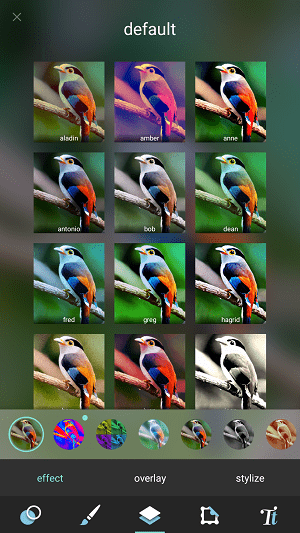
9. Pixlr


Pixlr is the right photo editor app for everyone; it has all the tools that a user might need. It has over 2 million combinations of free effects, overlays, and filters. You can create photo collages with various layouts, background and spacing options.

Also, it has the ability to stylize photo with a doodle, pencil drawings, and ink sketches. You can share the images directly to various social networking sites. It is free to download with in-app purchases and contains ads.
Special Features of Pixlr


Option to mark the most used effect or overlay as Favorite.


Remarkable on-touch enhancement tools


Auto-fix feature for automatically balancing color in an image


Collage feature with up to 25 photos and various layouts, background, and spacing options
10. Photo Lab


Photo Lab gives your photos a unique touch. It has a collection of over 900 different effects such as realistic photomontages, stylish photo filters, beautiful frames, creative artistic effects, collages for multiple photos and lots more.

With a simple and intuitive interface, the photo editing app is quite easily manageable. The built-in photo editor comes with every basic tool that a user might need: crop, rotate, lighting, and sharpness, and even touch-up. Moreover, you can save your creation to the gallery, share it easily to Twitter, Facebook, Instagram or send it as a message. It has a free version available that displays ads. But the main drawback is that it watermarks your photos when you use its free version.
Special Features of Photo Lab

Sponsor ads:

Gihosoft Free iPhone Data Recovery:iphonerecovery.com

Free iPhone Data Recovery Software for Windows/Mac
Recover up to 12+ types of files, including contacts, SMS, photos, WhatsApp, Viber, notes, etc.

Restore lost data from iOS devices directly or from iTunes and iCloud backup

Recover iPhone data lost due to iOS upgrade/jailbreak, accidental deletion, device lost or broken

Support all the latest iPhone, iPad and iPod Touch

Both Free and Pro version.

If you lost data after you updated to a new iPhone, you can always use Gihosoft iPhone Data Recovery to get the data back from the old iPhone or backup.

Worth reading:download youtube 1080p

Top 10 Best FRP Bypass Tools to Bypass Google Account on Android Device 2019


More than 50 preset styles to choose from for one-touch editing


Advanced face detection algorithm for face photo montages

Also Read: 8 Best Free Android Data Recovery Software to Restore Deleted Files
Choosing The Best Photo Editor For Android

With the apps enlisted above, you can transform your photos by artistic masterpieces. You can choose the app according to your requirement. For example, for making collages we recommend using PicsArt or Pixlr. Similarly, if you want to add fun effects to your selfies, try YouCam Perfect or Airbrush.

Did you find this list of best Android photo editor apps for 2019 helpful? Share your reviews and suggestions in the comments below.