Sunday, August 4, 2019

iPhone 11 Release Date: When will Apple launch 2019 iPhones?


In just over a month from now, Apple will unveil its much-awaited 2019 iPhones. One of the most frequently asked questions we get these days are: When will Apple release iPhone 11? When is the iPhone 11 release date?

For the last few years, Apple has been launching the new iPhones in a predictable manner in September. Here’s a look at the announcement dates and the release dates for the last few years.


iPhone XS, iPhone XS Max, and iPhone XR were announced on Wednesday, September 12, 2018 and went on sale on September 21, 2018.


iPhone X, iPhone 8 and iPhone 8 Plus were announced on Tuesday, September 12, 2017. iPhone X went on sale on November 3, 2017, and iPhone 8 and iPhone 8 Plus went on sale on September 22, 2017.


iPhone 7 and iPhone 7 Plus were announced on Wednesday, September 7, 2016, and were available on September 16th, 2016.
iPhone 11 Release Date

As you can see, 2017 was an exception as Apple had to delay the launch of iPhone X to October due to supply chain constraints for the OLED displays. But this year, we expect Apple to follow the same pattern as last year. So we expect Apple to launch the iPhone 11 in September. According to rumors, Apple will unveil iPhone 11 at an event on September 9th or September 10th. It will most likely be September 10th, as Apple seems to prefer holding the iPhone launch event on a Tuesday or Wednesday.

After the launch, the new iPhones are usually available for pre-order on a Friday and go for sale the following Friday. So if Apple follows the same pattern, and unveils the new iPhone 11 models in the second week of September then the new iPhones should be available for pre-order on Friday, September 13 and should go on sale the following Friday. So we expect Apple to release iPhone 11 on September 20.Read Next:imessage on android

Read Next:must have android apps

Read Next:tencent gaming buddy pubg update


As per the leaks, below are the major hardware changes that the iPhone 11 and iPhone 11 Max will pack:


Faster A13 Bionic chip


Triple-camera system


Improved TrueDepth camera system


Reverse Wireless Charging


Bigger Battery


New Haptic Engine

Are you excited about iPhone 11? Do you plan to upgrade to iPhone 11 when it releases in September? Let us know in the comments.

Introduction to PassFab iPhone Backup Unlock Software


Introduction to PassFab iPhone Backup Unlock Software

PassFab iPhone Backup Unlock software is designed to unlock backup of iDevices that are encrypted by iTunes. The software can quickly recover iTunes backup password, remove backup encryption settings and remove screen time passcode for all iOS devices. Whatever iTunes backup passcode problems you met, PassFab iPhone Backup Unlock software helps you out of any frustrating iTunes backup password situations with ease.


Features of PassFab iPhone Backup Unlock software:


Retrieve iTunes backup passwords of iDevices in a quick way.


Can easily bypass your device's screen time passcode without removing your data.


Help you obliterate Apple device's backup encryption settings with just one click.


Provide three effective attack modes to suit different situations of iPhone backup passwords.


GPU acceleration technique is available.
How to Use PassFab iPhone Backup Unlock Software to Recover iTunes Backup Password

Following are a few steps to use PassFab iPhone Backup Unlock software to retrieve iTunes backup password.

Step 1. After installing the software, select the "Retrieve iTunes backup password" option. You will easily find all the backup files on your computer. Select the iTunes backup you prefer to proceed.


Step 2. The PassFab iPhone Backup Unlock software offers you three attack modes to unlock backup. Choose the one that suits you the most.


Step 3. Now, click on the "Start" button of start unlocking backup. It will take some time so be patient. Finally, a pop-up window will appear showing the backup password. You can unlock the backup of iPhone by this.


If you are interested in retrieving iTunes backup password with PassFab iPhone Backup Unlock Software software, watch video demonstrationreleased by PassFab official on YouTube.

Limitations:


PassFab iPhone Backup Unlock Software is good for unlocking iPhone backup but it is expensive. You can use it on only one computer after purchasing it. For use on another computer or device, you have to purchase it again.


According to reviews on the Internet, PassFab cracks many times during unlocking backup password of iPhone.

PassFab iPhone Backup Unlock software claims to save your data but sudden cracking can lead to losing your data. There must be an easy, effective, and more reliable alternative to PassFab iPhone Backup Unlock software.

If you lost data after you updated to a new iPhone, you can always use Gihosoft iPhone Data Recovery to get the data back from the old iPhone or backup.You may also like: iphonerecovery.com

Monday, July 29, 2019

Download iOS 13 and iPadOS 13 Beta 5


Apple today released the fifth developer beta of iOS 13 and iPadOS 13. The last beta of iOS 13 fixed a number of bugs and stability issues and the fifth beta is expected to follow the same route.

With only around two months left for Apple to publicly release iOS 13 and iPadOS 13 to the public, it makes sense that the company is now focusing on fixing bugs and ironing out other issues with the OSes instead of adding new features. If you were frustrated with the sheer number of bugs in the initial iOS 13 and iPadOS 13 beta build, you might want to give the latest beta a try as it a major step up in terms of stability.
Download iOS 13 and iPadOS 13 Beta 5

If you are already running iOS 13 Developer Beta 4 on your iPhone, you just need to go to Settings -> General -> Software Update and download the beta 5 OTA. The same steps are also applicable for downloading iPadOS 13 Beta 4.

Apple will also release the third public beta of iOS 13 and iPadOS 13 to developers later this week.
iOS 13 Features

iOS 13 comes with a number of major new features including a redesigned Reminders app, faster Face ID, system-wide Dark mode, improved Safari, and more.

1. Dark Mode

The biggest feature of iOS 13 is the new Dark Mode. This is truly system-wide. It stretches from the Lock screen to the widgets screen to Apple’s own apps. Even the keyboard gets a better version of the dark mode. Dark mode can be enabled easily from the Control Center.


2. New Reminders App

There is a new smarter and enhanced Reminders app in iOS 13. It uses Natural Language Processing which makes it easier to add reminders and tasks.

Read: iOS 13 Reminders App Hands-On

3. Redesigned Volume HUD

The new Volume HUD appears in the top-left corner of the screen in an unintrusive manner. It first shows up as a full-sized slide. But it immediately shrinks and becomes unintrusive.


4. Improved Safari

Safari has received a major update in iOS 13 and iPadOS 13. It now features a dedicated Download manager which means one can now use the browser to download files.

On iPadOS 13, Safari will now load the desktop version of websites to offer a better browsing experience.

5. QuickPath

The stock keyboard in iOS 13 has finally gained gesture-based typing known as QuickPath. This is similar to the swipe-based typing experience offered by SwiftKey and Gboard.

Sponsor ads:

Gihosoft RePicvid Free Photo Recovery Software provides a free photo recovery software for windows to help users recover the deleted or lost photo for free.

If you lost data after you updated to a new iPhone, you can always use Gihosoft iPhone Data Recovery to get the data back from the old iPhone or backup.You may also like: iphonerecovery.com

Friday, July 12, 2019

How to Jailbreak iOS 12.2 – iOS 12 on iPhone and iPad Using Unc0ver Jailbreak


The @Pwn20wnd team might not have updated Unc0ver jailbreak with support for A12 devices like the iPhone XS and iPhone XR but it has been quick to update its jailbreaking tool to use the new Sock Puppet exploit. This allows the tool to jailbreak iPhones and iPads running iOS 12.2 while it was previously limited to iOS 12 – iOS 12.1.2.

While one can now jailbreak iOS 12.1.2 – iOS 12.2, the Sock Puppet exploit being used is a bit unstable in nature. The Unc0ver team will likely resolve these issues with continuous future updates. Since Apple is no longer signing iOS 12.2, you cannot downgrade back to it if your iPhone or iPad is running a newer build of iOS. In such a scenario, there’s not much you can do except wait and hope that an iOS 12.3 jailbreak is also released soon.
Compatible Devices

For now, you can jailbreak the following iPhones and iPad using Unc0ver jailbreak


iPhone 5s (iOS 12 – iOS 12.1.2)


iPhone 6 (iOS 12 – iOS 12.1.2)


iPhone 6 Plus (iOS 12 – iOS 12.1.2)


iPhone 6s


iPhone 6s Plus


iPhone 7


iPhone 7 Plus


iPhone SE


iPhone 8


iPhone 8 Plus


iPhone X


iPad Air


6th gen iPad
Pre-Requisites


Delete any iOS 12 OTA file downloaded on your iPhone/iPad. Delete it from Settings -> Storage and then proceed to reboot your device before attempting to jailbreak it.


To prevent future iOS 12 OTA updates from being downloaded on your device, you can install the tvOS 12 profile on it.


Make sure to create a backup of all important data on the device.


While you can jailbreak iOS 12.1.2 – iOS 12.2 using Uncover, the Sock Puppet exploit is a bit unreliable in nature. It also has some issues with A7-A8 devices like the iPhone 5s, iPhone for now.
Guide to Jailbreak iOS 12 – iOS 12.2 Using Unc0ver
Step 1: Download Latest Unc0ver beta

On your iPhone/iPad running iOS 12 – iOS 12.2, go to ignition.fun. You can continue using the website instead of using the Ignition app.

Using the search button at the bottom, find unc0ver. Make sure to download the beta version of Unc0ver since that’s the one which supports iOS 12 – iOS 12.2 jailbreaking right now. Tap the Get button to download the app followed by the Install button from the prompt you get. Depending on the speed of your internet connection, the installation process can take a few minutes.


Step 2: Trust Certificate

Head over to Settings-> General -> Device Management. Tap the developer name and trust the certificate. Without this, you won’t be able to launch the unc0ver jailbreak app on your iPhone.
Step 3: Jailbreak iOS 12 – iOS 12.2 Using unc0ver

Open Unc0ver, tap the Jailbreak button and wait for the app to do its job. Your iPhone or iPad will respring during the process after which you should see the Cydia icon on your home screen.

If the app gets stuck at the “Extracting Cydia…”step, you will need to reboot your iPhone/iPad and then try to jailbreak it again.


After successfully jailbreaking your iPhone or iPad on iOS 12 – iOS 12.2 with unc0ver jailbreak, check out an exhaustive list of iOS 12 – iOS 12.1.2 compatible jailbreak tweaks to customize your iPhone.

Sponsor ads:

Gihosoft RePicvid Free Photo Recovery Software provides a free photo recovery software for windows to help users recover the deleted or lost photo for free.

If you lost data after you updated to a new iPhone, you can always use Gihosoft iPhone Data Recovery to get the data back from the old iPhone or backup.You may also like: iphonerecovery.com

Thursday, June 27, 2019

How to Bypass Parental Controls on iPhone, Using iTunes, Data Loss


How to Bypass Parental Controls on iPhone, Using iTunes, Data Loss

There is no specific solution to bypass parental controls passcode from Apple official. They only suggest you reset your iPhone to factory settings via iTunes, which can be implemented for broader passcode-related problems. You need to erase your iOS device to get around the forgotten parental controls passcode via iTunes.

How to bypass parental controls on iPhone by using iTunes:

Step 1. Turn off "Find My iPhone", and update your iTunes to the latest version.

Step 2. Connect your iPhone to iTunes with a USB cable. Click on "Trust This Computer" when it pops up on your iPhone.

Step 3. Go to "Summary" tab and click on "Restore iPhone".


Step 4. Click "Restore" again. Then iTunes will erase your iPhone as well as your parental controls passcode.


If you don’t know how to bypass parental controls passcode on iPhone, this article can help to solve your problem efficiently. Sponsor ads:


Gihosoft RePicvid Free Photo Recovery Software provides a free photo recovery software for windows to help users recover the deleted or lost photo for free.

If you lost data after you updated to a new iPhone, you can always use Gihosoft iPhone Data Recovery to get the data back from the old iPhone or backup.You may also like: iphonerecovery.com

Tuesday, June 25, 2019

iOS 13 Will Add Support for Hong Kong’s Octopus Card


The NFC chip inside iPhones is going to get a lot more useful once iOS 13 lands. Apple is opening up the NFC chip to developers on a per-app basis with iOS 13 which has led governments to apps and systems to add iPhone support. The latest one to join the list is Hong King’s Octopus payment system.

While there has been no official announcement from any Hong Kong body regarding this, Ata Distance has found snippets of code in Apple Pay in iOS 13 beta which hints at impending support for Octopus cards in Hong Kong.

While iOS 13 is going to be available for iPhone 6s and up, the new NFC-related functionalities are only going to be available on the iPhone 7 and newer.

Octopus cards are extremely popular in Hong Kong and are used by people for any kind of retail transaction or for public transport payments. It is based on the same FeliCa standard that is used by Japan’s Suica card.

The U.K. and the Japan government have already confirmed that post iOS 13, iPhones will be able to read NFC tags in Japanese and British passports. Similarly, the German government has also confirmed that iPhones running iOS 13 will be able to read all German ID cards including residence permits, biometric passports, and more.Read more:tamildbox alternatives

Read more:download videos from tumblr

Read more:download video from url


[Via Ata Distance]

Thursday, June 20, 2019

Hong Kong Customs Officials Raid Yields Counterfeit iPhone Parts


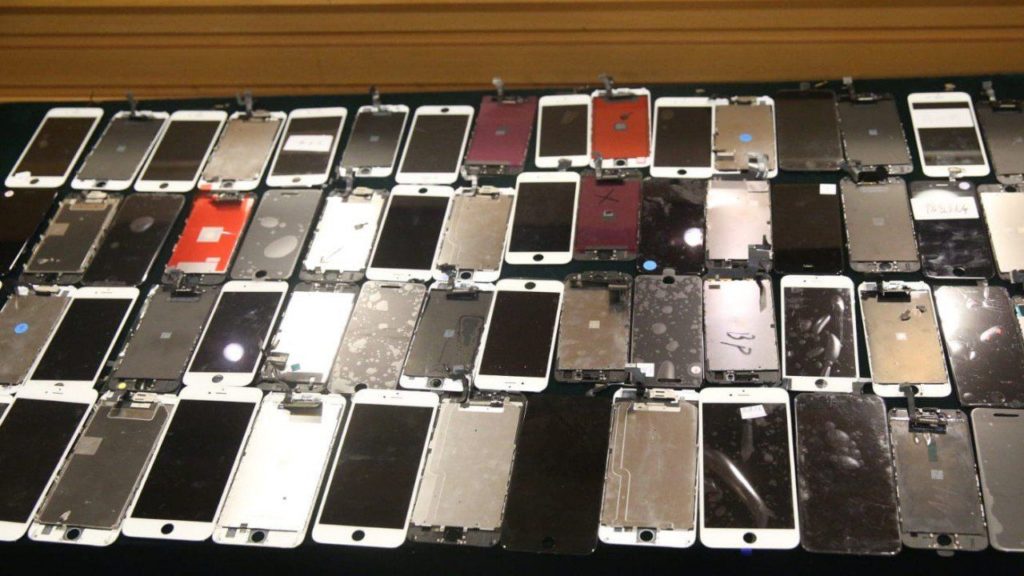
Customs officials have seized counterfeit parts worth $120,000 in a raid on a Hong Kong repair shop. According to the officials, the repair shop was using counterfeit parts to fix broken devices including iPhone for international clients.


The Custom officers conducted the raid in lunchtime at an industrial unit in Tuen Mun. The facility was being used as a workshop and a warehouse to store counterfeit goods. Apparently, the business operated by fixing iPhones sent from as far as Australia, the U.S, and the United Kingdom. Once received, the iPhones were fixed by using fake parts and sent back to the client via airmail.

The warehouse in question spread across 5,000 sq ft and officials recovered 3,900 counterfeit phones and some machinery to carry out the repairs. It is further reported that three workers were hired to carry on the repairs, however, the local workers were not arrested.

According to the report from the South China Morning Post, Investigating officers had received a tip-off from a trademark owner a month ago. The entire operation passed under the radar as the company was only servicing international clients. Meanwhile, the repair work included replacing cracked screens and other physical damages.
Our Take

Apple products are among the world’s most counterfeited brands. The Hong Kong raid haul is not surprising considering the large volume of counterfeit iPhones that flood the market. The worst part is that counterfeit iPhones might pass on a genuine one to an untrained eye.

While you can still spot a counterfeit iPhone, it is not easy to spot a counterfeit part since it is fitted inside an iPhone. In a majority of cases, second-hand phone dealers send the devices to overseas and get it repaired at a ridiculously low price, despite the shipping fees. It is always preferable to buy refurbished iPhones from Apple’s Certified Refurbishing and as far as repairs are concerned it is better to head over to your nearest authorized dealer.

[via-SCMP]

Sponsor ads:

Gihosoft RePicvid Free Photo Recovery Software provides a free photo recovery software for windows to help users recover the deleted or lost photo for free.

If you lost data after you updated to a new iPhone, you can always use Gihosoft iPhone Data Recovery to get the data back from the old iPhone or backup.You may also like: iphonerecovery.com

iPhone Manager:Get the ultimate Gihosoft iPhone Manager. Free download for PC/Mac.

Go Live on Tik Tok/Musical.ly in 2019

Read more:best youtube downloader