Sunday, June 10, 2018

Backing up WeChat Data on iPhone

Backing up WeChat Data on iPhone

Back up WeChat Messages on iPhone


The Cloud backup feature is not supported from WeChat 6.2.5. However, WeChat will keep your chat history permanently within the application on your iPhone as long as you do not remove the app and the device has enough storage space.
Back up WeChat Chat History to PC


For this to work, you have to connect both your iPhone and PC to the same internet network. After connecting your devices to the same internet connection, follow the steps below:


Step 1: Open WeChat for Windows. Click More in the lower-left corner.


Step 2: Select Backup and Restore and then tap Back up on PC.


Step 3: Select the chat history to back up on your mobile device. Confirm for the backup process to begin. Keep the devices connected to the same internet connection for the back up to finish.


Do you like this story?


Sponsor Ads:


Gihosoft iPhone Data Recovery is a professional iPhone Data Recovery software to get back all your lost text message, photo, video, call history, note, contact and more from iPhone/iPad/iPod Touch. It offers a full solution to recover your lost data in different tough situations. Besides recovering data directly from iPhone, iPad and iPod touch, it also allows you to recover data from iCloud and iTunes backup files.


Top 7 Ways to Fix WeChat Update Stuck on iPhone/iPad

Top 7 Ways to Fix WeChat Update Stuck on iPhone/iPad


1Restart Your iPhone/iPad


Your iOS device may have a bug that is keeping the WeChat from finishing the update. This can be fixed by simply restarting the device via the following the steps below:
iPhone X


Step 1: Press both the side button and either volume up or down button. Hold the buttons until a slider shows.


Step 2: Drag this slider. This turns off the iPhone X.


Step 3: Press and hold the side button again until an Apple logo appears.
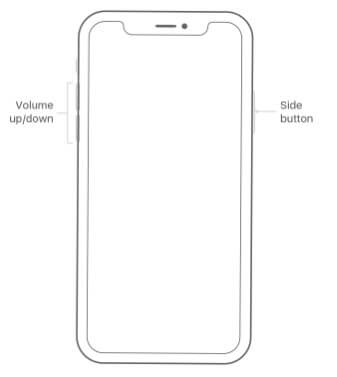


iPod touch, iPad, or iPhone 8 and Earlier


Step 1: Press and hold the Side (or Top) button until you see a slider.


Step 2: Drag this slider. Your device should turn off.


Step 3: Press and hold the Side (or Top) button again until an Apple logo shows.


2Manage Your iPhone Storage


An application update on iPhone/iPad will require some extra space. If this space is lacking in your device, you will experience the iPhone WeChat update stuck problem. To check and manage the space available on your iPhone, follow the steps below:


Step 1: Open Settings and then tap General.


Step 2: Click Storage & iCloud Usage and then tap Manage Storage.


Step 3: Confirm that you want to delete the apps you do not use or need. Then remove them from your device by tapping Delete App. Try updating your WeChat again.


3Clear WeChat Cache


WeChat stores data in its temporary storage which allows the data to be accessed faster. This makes the application quick in processing requests. However, the cache may be responsible for the WeChat crash or stuck. Follow the steps below to clear the WeChat cache.


Step 1: Tap [Me], then select Settings, tap on General, tap Storage, finally click Clear WeChat.


Step 2: Choose the chat logs and the groups you wish to clear.


Do you like this story?


Sponsor Ads:


Gihosoft iPhone Data Recovery is a professional iPhone Data Recovery software to get back all your lost text message, photo, video, call history, note, contact and more from iPhone/iPad/iPod Touch. It offers a full solution to recover your lost data in different tough situations. Besides recovering data directly from iPhone, iPad and iPod touch, it also allows you to recover data from iCloud and iTunes backup files.


Note: “Storage” only cleans up the cache for your WeChat chat sessions and will not remove your chat history. From version 6.3.24 of WeChat, this cache for the chat sessions will be automatically cleared up regularly.
4Toggle Airplane Mode on and off


Airplane mode may be interfering with your WeChat update. To eliminate iPhone WeChat update stuck problem which is caused by Airplane mode, follow the steps below:


Step 1: Open Settings and Scroll down until you locate Airplane Mode.


Step 2: Toggle off the Airplane Mode switch.


5Update WeChat Version


Sometimes, a WeChat update stuck or crash is as a result of you have an older version of the application on your iOS device. This can be fixed by updating your WeChat. To update your WeChat, you need to download the latest version at http://www.wechat.com/en/.
6Change Another Wi-Fi Hotspot


Updating WeChat requires an active internet connection. If the current Wi-Fi hotspot you are connected to is not working, you will experience the iPhone WeChat update stuck issue. To solve this, you can switch to a new Wi-Fi hotspot by following the steps below:


Step 1: Open Settings and then tap Wi-Fi. Turn it on if it is off.


Step 2: Tap the name of the Wi-Fi you wish to join. Enter a password if prompted.


7Reset Network Settings


Your iPhone/iPad may have a network issue that prevents it from connecting to the internet. This issue can be fixed by following the steps below:


Step 1: Open Settings and tap General.


Step 2: Tap Reset and then click Reset Network Settings.


Step 3: Enter your passcode if prompted for one. Tap Reset Network settings then.


Sunday, August 27, 2017

This could be the screen of the next iPhone


This time again a new trio of images of what is possibly the screen or SlashLeaks of the next iPhone 7s with a next-generation 3D touch module. Must Read:How to get more storage on iPhone?


Throughout this wait on the departure of the new iPhone phones, have been filtering various images and videos of what could be some parts that make it up, making the big fans of this brand, take the difficult task of waiting Until the official launch sometime next month.
Will this be the screen of the iPhone 8 / 7S?


But from this new information we can not attest that it is totally true and therefore could not determine if the part shown is pertaining to the next Apple iPhone of 4.7 inches or the model of iPhone 7 already on the market.


Unfortunately, there is not much to get out of the images that are presented, since we can only observe a cut for what would be the start button on the front face, so the button is expected to be a non-mobile variant like the IPhone 7.


That could mean that the phone could continue to use the captured fingerprints on the Home button unlike what would be the new range of Iphone 8 since it would replace the Touch ID by the advanced 3D facial scanner.iMyFone D-Back iPhone Data Recovery Get Back Lost Files on iPhone:If you lost videos from iOS Camerall Roll which are nowhere to download again, you can use Gihosoft iPhone Data Recovery to get back deleted videos from iOS device including iPhone, iPad and iPod Touch.
Jihosoft iPhone Backup Extractor Extract and recover all types of data from iPhone backup files, such as camera roll photos, videos, SMS, contacts, reminders, WhatsApp, and etc.
Gihosoft Android data recovery Free is a super awesome software specialized in Android file recovery. With this program, you are able to recover deleted photos, music, videos, messages, contacts, call logs, WhatsApp messages, Viber chat history and more from Samsung, Huawei, LG, HTC, Motorola, Google, Oneplus, Sony, Lenovo, ZTE and other Android devices directly. Meanwhile, this Android data recovery software is available for both Windows and Mac platforms.


Other components of the iPhone 8 / 7S


Undoubtedly, with all that attracts the fact of this launch of these devices, on Twitter by the well-known leakage source of Benjamin Geski, unveiled what is possibly the logical card of the new iPhone that is about to leave.


All of the iconic news, as this could match the brand on the logic board on the back of an alleged Apple 11 chip that came to light by Weibo earlier in the week.


Rumors say the processor is designed and built with TSMC's latest 10-nanometer technology, so it should appeal to a smaller die size and allow the CPU to work faster and with less power.

Tuesday, August 22, 2017

What's new in iOS 11 beta 7 for developers?


During yesterday, Apple released iOS 11 beta 7 for developers , which will probably be the last trial version before the time of truth, the official launch of iOS 11 the month of September.


As it is tradition in any update, it includes a series of patches to solve errors and problems detected in previous versions , as well as a series of novelties that we proceed to explain for which values ​​yourself if it is worth downloading.


First of all, remember that it is a beta and not an official version , so it will have bugs of all kinds and that is also a developer version, that is, it is not public. Therefore, you will need a special profile. However, if you wish, here we tell you how to download it .


IOS 11 beta 7 developer news


Among the new features detected:


Bluetooth : CBManagerStatePoweredOff now indicates when Bluetooth is disabled in Settings and when the user has limited Bluetooth in the Control Center for use with Apple Watch and Apple Pencil.


New icons : Apple Music has undergone a refresh on its icon in the Control Center when there is no music playing. Related Read:iMyFone recover deleted text messages iPhone without backup


New lock screen design , which has been merged with the notification center to increase simplicity and speed of use.


New features and slight aesthetic changes in the Camera, Photos and Siri app.


Apple Pay Integration in the native Messages app .


Detection of a bug that prevented users from switching from iOS 11 beta 5 to beta 6 or later. To resolve this, go to Settings > General > Storage and delete the download to reinstall.If you ever lost or accidentally deleted data from your iOS device, you can use the professional Gihosoft iPhone Data Recovery software to retrieve important data from iPhone, iPad or iPod Touch even without backup.

Jihosoft iPhone Backup Extractor Extract and recover all types of data from iPhone backup files, such as camera roll photos, videos, SMS, contacts, reminders, WhatsApp, and etc.


New design that allows a more customizable Control Center .


Implementation of the " Do not disturb the steering wheel " mode, one of the most expected in this new operating system. This is how you can configure it properly .


Via | MacRumors