Sunday, May 26, 2019

Top 7 Solutions to Fix Hulu Not Working on Apple TV


Solution 1. Check the Compatibility

First of all, you should check if the Apple TV is compatible enough to run Hulu app. In fact, your Apple TV must be 4th generation or newer to run Hulu app on it.
Solution 2. Restart Apple TV

If the device is compatible enough, you will have to perform a restart to check if the problem is resolved. In fact, restarting can resolve various minor issues related to apps run on Apple TV.

Step 1: Go to Settings on your Apple TV device and select the option labeled “General”.

Step 2: Navigate to the “Restart” option found in the list of options and select it.


Solution 3. Update Apps on Apple TV

If the problem persists, you should try updating the apps on Apple TV.

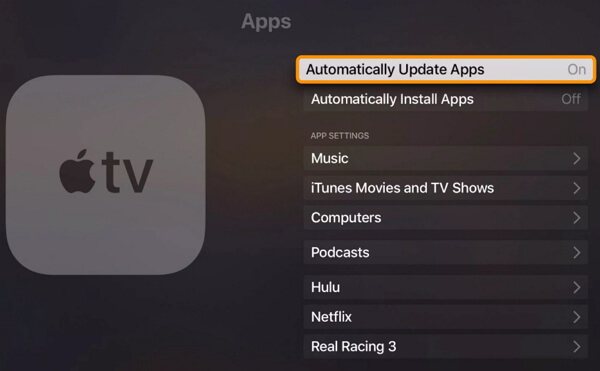
Step 1: Go to Settings app on your Apple TV device and select the option “Apps”.

Step 2: Select the option “Automatically Update Apps” from the options.

Step 3: Let the apps be updated automatically now. Give it some time and check if the app is updated. To do that, you should go to “Purchased” on App store. Then, select “Recently Updated”.


Solution 4. Restart Hulu App

If you are yet to succeed, you can try restarting Hulu app.

Step 1: Get the Apple TV turned on (if it is still switched off).

Step 2: Let the TV be on home screen. Double click the TV button on the remote.

Step 3: Now, on the Trackpad, you should swipe right and locate Hulu app. Once located, just swipe the app up to close the app.

Step 4: Exit the multitasking mode simply by hitting the menu button on the remote. Launch Hulu once again to see if it works now.


Solution 5. Turn off Send Data to Apple

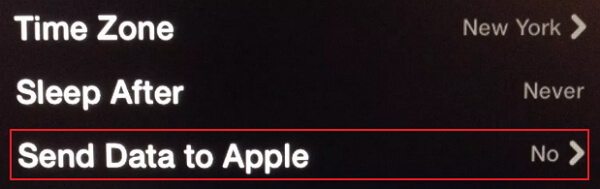
If you do not have any luck yet, you are able to try turning off “Send data to Apple”. By turning off this feature, you stop Apple TV from communicating with their servers while using Hulu. This is especially applicable for slower internet connections.

Step 1: Go to Settings app on your Apple TV and select the option “General”.

Step 2: Then, select the option Send Data to Apple and turn the settings off.


Solution 6. Restore Apple TV to Factory Settings

Restoring Apple TV to its factory settings can resolve various issues. Mentioned below are the steps you can follow to fix this issue.

Step 1: Go to Settings option and select General. Then, go to Reset.

Step 2: Select the option Restore. This will lead to install the latest update as well.


Important: You should also remember that this is a pretty desperate measure. However, it might work for most users. As a result of restoring the device, you need reconfigure all the settings of the device. Also, the passwords will be reset and you will have to reenter everything related to remote, AirPlay and WiFi. So, you should opt to this measure as the last resort.
Solution 7. Fix Hulu Not Working on Apple TV without Data Loss

Also Read:Best free Beat making software

Also Read:view private Instagram Profiles

Also Read:Permanently Delete Line Messages and Chat History on iPhone

Also Read:Hack Facebook account online of any user? Full 100% working

Also Read:Top 11 Icon Packs for Android to customize all the icons present 2019

Also Read:File Systems: FAT32 vs. exFAT vs. NTFS

Also Read:Test RAM Memory for Windows and Mac in 2019

Monday, May 20, 2019

How to Fix iPhone App Store Not Downloading Apps


iPhone is home to an abundant number of apps. The go to place to download these amazing apps is called the Apple App Store. But, in some situations, the iPhone App Store won't load or download apps on iOS 12/11 even after repeated attempts. This happens when there is a bug on your phone. Sometimes, due to some software glitches, your App Store not working even though your internet connection is fine. Fortunately, you have come to the right place. After going through the article and carefully following every step accurately, the apps not downloading in App Store on iPhone will be surely be fixed, hopefully never to return again. And you will be back to downloading apps in no time!
Solution1:Clear App Store Cache

What do you do when your iPhone app store won't load? An effective method to fix this problem is by clearing the App Store cache in your iPhone. You can do this by first launching the App Store app in your iPhone or iPad and tapping any of the navigation buttons 10 times (Featured, Explore, Top Charts, Updates, Search). This will immediately clear all the existing cache from your iPhone. It also forces the App Store app to re-download all the information from the start. This procedure can often solve the weird bugs your iPhone might face.


Solution 2: Force Refresh App Store

Go to App Store or the App Store on your iPad normally and tap down the App Store icon until you see spinning cursor notification on the top of the screen. You need to tap at the top of the screen.


This forces the Apple App Store to refresh and update instantly. This pull down and refresh function will let you see any available updates for your App Store.
Solution 3: Force Quit App Store

When you see that your App Store is not responding, you have to force quit the App Store on your iPhone as it cannot be closed with the normal procedure. To access this feature, you need to go the fast app switcher on your Apple phone by tapping the home button twice. Slide through to the App Store and swipe up the app to force quit it.


Solution 4: Access App Store with Cellular Data

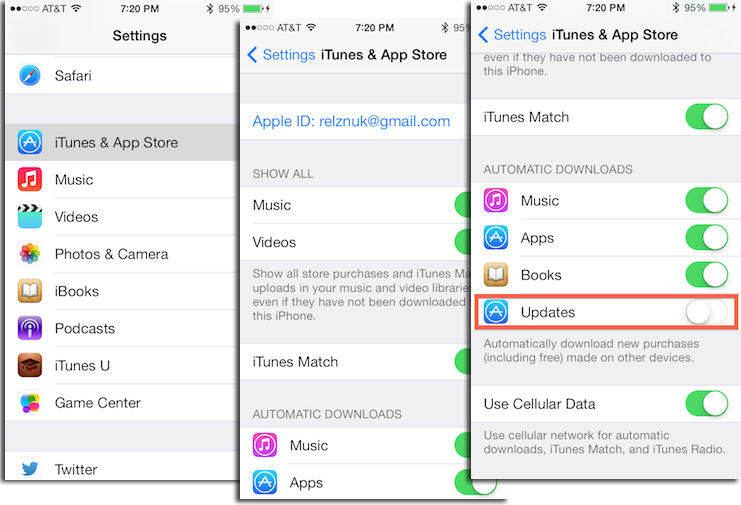
"Why won't my App Store load" has been asked by many users. Sometimes, by mistake, people tend to withdraw access to cellular data for the App Store. In such cases, your App Store might fail to connect to the internet. In order to solve this issue, simply turn on cellular data.


Next, turn on the button for App Store so that your Apple phone gives the App Store permission to access your cellular data.


Solution 5: Sign out of iTunes & App Store

You can sign out of your iTunes account or your App Store and sign in again to try and solve the issue. You can do this by first launching the settings tab and going to the iTunes and App Store option.


Now simply tap on your Apple ID and click the sign out option.


After you have successfully signed out of your account, go to the same tab and sign in to your Apple account with your ID and password.
Solution 6: Update iPhone Software

Open the settings tab and then open the option with name 'General'.After which you need to tap the software update option. Then click "Download and Install" to start.


Solution 7: Restart/Force Restart Your iPhone

If you need to restart your iPhone, you need to long press and hold the sleep/wake button of your iPhone and patiently wait until the power off option appears on your phone. For iPhone X/XR/XS, you need to press and hold the Side button and either volume button until the power off slider appears.

If a simpe restart does not help fix this problem, you can force restart your iPhone X/XR/XS/8/7/6s/6.

For iPhone X/XR/XS/8


Press and release the Volume Up button, then Press and release Volume Down button.


Now, press and hold the Power switch and leave when the Apple logo appears. Keep in mind to do these three steps in quick succession.


Enter passcode to complete the process.

For iPhone 7/7 Plus:


Press Power switch on the right side plus the Volume down button on the left side together.


Now, wait for the Apple logo and leave. Then wait for the startup sequence.

For iPhone 6/SE or Earlier:


Press the Home button and the Power switch simultaneously.


Wait for the Apple logo to appear and leave the buttons.


The phone will go into the startup sequence.


After sometime enter your passcode when prompted.


Solution 8: Reset Network Settings

From the Home screen of your iPhone, navigate to the settings and then tap the general button and then tap the reset button. After which you need to tap the 'reset network settings' button. You will be asked to enter your passcode. When you successfully enter the passcode of your Apple phone, your phone's network settings will be reset successfully.


Solution 9: Check App Server

Sometimes the App Store down because the server is down. To check the app server on your iPhone, go to the 'System Status webpage' on your iPhone, after which you will see the current server status of all your apps. You will be notified if something is wrong with your apps in this page.


Solution 10: Reset iPhone Settings

Before restoring iPhone to factory settings, you need to ensure that all your data is backed up. After you get that step out of the way, you are ready to perform the factory reset. This procedure will completely wipe out all the data on your phone and restore it to how it came out from the factory.

Go to Settings > General > Reset -> Reset All Content and Settings.


Extra Bonus: How to Fix iPhone Stuck and Crashing Also Read:Watch Soccer Live on TV
Also Read:movie4k alternatives
Also Read:10 Websites to Watch Indian Live Television
Sponsor ads:
Gihosoft RePicvid Free Photo Recovery Software provides a free photo recovery software for windows to help users recover the deleted or lost photo for free.
If you lost data after you updated to a new iPhone, you can always use Gihosoft iPhone Data Recovery to get the data back from the old iPhone or backup.You may also like: iphonerecovery.com
If you use android phones, please choose Gihosoft Android Data Recovery.With Gihosoft Android Data Recovery, no longer afraid of data loss!
iPhone Manager:Get the ultimate Gihosoft iPhone Manager. Free download for PC/Mac.

Friday, April 26, 2019

iPhone 11 Max CAD Renderings and 360-Degree Video Leaks


A day after @onleaks posted 3D CAD renderings of the 2019 iPhone 11, he has now posted detailed 5K renders and 360-degree video of the 2019 iPhone 11 Max.

The 3D CAD renders show the iPhone 11 Max coming with a triple camera set up at the rear which does help give the rear a refreshed look. As for the front, it looks largely the same, with minimal bezels and a notch at the top to house the required Face ID sensors.

The iPhone 11 Max will be 8.1mm thick which means it is going to be notably thicker than the 7.7mm iPhone XS Max. Thankfully, if previous leaks are anything to go by, the thickness will be used by Apple to incorporate a larger battery on the handset. This will be beneficial since the iPhone 11 Max will come with reverse wireless charging which can be used to wirelessly charge other devices.


Like the iPhone 11, the iPhone 11 Max will feature a redesigned mute button that looks similar to previous iPads. It will also feature a Lightning connector at the bottom and not USB-C. The CAD renders point to the iPhone 11 Max featuring a single slab of glass at the rear which will also cover the triple-camera housing. This is different from the iPhone X/XS in which the rear glass has a cutout for the camera housing.
Our Take

As expected, the iPhone 11 Max is just a bigger version of the iPhone 11. The major highlight of both phones is going to be the triple camera set up at the rear along with the use of a frosted glass panel. It is likely that we will see Apple launch the 2019 iPhone 11 in new colors or finish to ensure that customers don’t complain about the design being outdated.

[Via CashKaro]

Sponsor ads:

Gihosoft RePicvid Free Photo Recovery Software provides a free photo recovery software for windows to help users recover the deleted or lost photo for free.

If you lost data after you updated to a new iPhone, you can always use Gihosoft iPhone Data Recovery to get the data back from the old iPhone or backup.You may also like: iphonerecovery.com

If you use android phones, please choose Gihosoft Android Data Recovery.With Gihosoft Android Data Recovery, no longer afraid of data loss!

Wednesday, April 24, 2019

Hack Pattern Lock Screen on Android Phones?


1 Hack Android Pattern Lock using Android Device Manager

Android Device Manager is certainly the second ultimate method you can use to crack pattern lock screen on an Android device. It is a feature that is present in all Android devices by default so that users can locate their device remotely in the case of missing or lost the device. You can use this service to unlock your Android device pattern lock as long as you are logged into the Google account. Fortunately, it is easy and simple to bypass your device pattern lock by taking assistance from this service. You can access this service on any device or computer.

Here is the simple guide on how to bypass Android pattern lock using Android Device Manager:

Step 1 To begin the process, access the Android Device Manager on your computer and then, log-in with Google account you are using on locked Android device.

Step 2 After that, choose your device and next, select "Erase" option from the main interface. This will erase Android phone completely.


Pros:


The process is short and simple.


It is the best way to unlock Android tablets and phones remotely.

Cons:


It might fail if the Android phone is not compatible.


You can unlock Android screen lock with this method if your Android phone is switched off.
Method 2: Reset Pattern Lock Using Samsung's 'Find My Mobile' Service

Find My Mobile is one of the ultimate methods to crack a pattern lock if you are a Samsung user. It is service provided by Samsung to users when they want to find their lost device or unlock their device in case of a forgotten password.

Here is the simple guide on how to break pattern lock on Android phones using 'Find My Mobile' service:

Step 1 To commence the process, access the Find My Mobile service on your computer. Next, you need to log-in with your Samsung Account to begin the process.


Step 2 Next, click on the "Unlock my Device" option from the left side-bar menu. After that, click on the "Unlock" button to execute pattern unlock on your phone.


Step 3 After your Samsung device is unlocked, you will get a message on your device.

Pros:


The process is simple and easy.


It is great for Samsung users.

Cons:


This service works only for Samsung devices.


It will not work if you have not set up a Samsung account.
Method 3: Bypass Pattern Lock on Android Phones Using "Forgot Pattern" (Android 4.4 or Below)

If you are having an Android device running with 4.4 or older version, then you can use Forgot Pattern feature to bypass pattern lock on Android device. It is the best method for those who are looking for a way on how to hack the Android pattern lock without any software.

Here is the simple guide on how to unlock pattern lock on your phone using the Forgot Pattern feature:

Step 1 To begin the process, enter the wrong pattern on your phone to get the "Forgot Pattern" option as shown in below figure. After you got the option, then click on it.


Step 2 After that, choose the option to bypass your phone pattern lock with your Google account. Here, you need to enter your Google credentials that are linked to your locked device.

Step 3 Next, Google will send you an email to unlock pattern or you will be able to reset your pattern lock right away.


Method 4: Factory Reset to Break Pattern Lock on Android Phones

The last method you can try to break pattern lock on an Android device is factory reset. Consider this method only when all the above method fails as this method will erase all the data and settings on your Android phone. To learn how to remove pattern lock on Android phone using factory reset, follow the below steps:

Step 1 To commence the process, enter your device in Recovery Mode. You can do this by pressing Power, Volume up and Home button together.

Step 2 Next, choose "Wipe data/factory reset" option using volume down and up key.


Step 3 After that, you need to confirm that you are sure to perform a factory reset on your device. Reboot your device once the process is completed and you will be able to access your locked Android device.Also Read:12 Best Alluc Alternatives Letting You Stream Movies and More in 2019

Also Read:Top 25 Best Netflix Cookies for You to Use Netflix for Free 2019

Also Read:Top 10 Best Rainierland Alternative Websites for You to Watch Movies in 2019

Also Read:Best KeepVid Alternative Websites For You to Download Videos 2019

Also Read:Delete Viber Message History on Your iPhone

Also Read:5 Best iOS Photo Backup Services in 2019

Also Read:Ultimate Guides to Fix Activation Error on iPhone in 2019

Also Read:What if There is Bad ESN or Blacklisted IMEI on Your iPhone

Also Read:Top 5 Free Converters to Convert MKV to MP4 with High Quality

Also Read:How to Recover Deleted Safari Bookmarks & History on iPhone or iPad

Also Read:Setup Dual Monitors in Windows 10 Computer 2019

Instagram Could Hide the Like Count on Photos


Instagram has considered hiding the like count on images uploaded to the social network, which would prevent people from seeing how many people have tapped the "heart" icon on each photo.


The feature was found by Jane Manchun Wong, who often hunts down features in testing in Instagram and Twitter. As depicted in an image shown by Wong, the like count on a photo is hidden by default and visible only by the person who posted the photo.


​


"We want your followers to focus on what you share, not how many likes your posts get. During this test, only the person who shared a post will see the total number of likes it gets," reads the description of the feature.


In a statement to The Verge, however, Instagram says that the feature is not being tested at the current time: "We're not testing this at the moment, but exploring ways to reduce pressure on Instagram is something we're always thinking about.


Hiding likes would fundamentally change the way Instagram works, as liking photos and garnering likes is one of the platform's main features.Sponsor ads:

Gihosoft RePicvid Free Photo Recovery Software provides a free photo recovery software for windows to help users recover the deleted or lost photo for free.

If you lost data after you updated to a new iPhone, you can always use Gihosoft iPhone Data Recovery to get the data back from the old iPhone or backup.You may also like: iphonerecovery.com

If you use android phones, please choose Gihosoft Android Data Recovery.With Gihosoft Android Data Recovery, no longer afraid of data loss!


Article Link: Instagram Could Hide the Like Count on Photos

Monday, April 22, 2019

11 Best Android Launchers to Customize Your Smartphone


Samsung’s initial UI, the TouchWiz was the most hated Android skin atop any smartphone so people resorted to launchers. Even though it has changed everything with the One UI, people still have complains, with not just Samsung’ UI but also Huawei’s EMUI. Android launchers have always stunned us with the amount of customization they provide, regardless of how much the premium version costs. So, today we bring you a list of 11 best android launchers that will make your phone look like either Game of Thrones of Captain America.

Best Android Launchers to Customize Your Smartphone:


Nova Launcher


Microsoft Launcher


GO Launcher


Evie Launcher


Apex Launcher


U Launcher Lite


CM Launcher 3D


Google Now Launcher


Smart Launcher 5


ADW Launcher 2


POCO Launcher
1. Nova Launcher

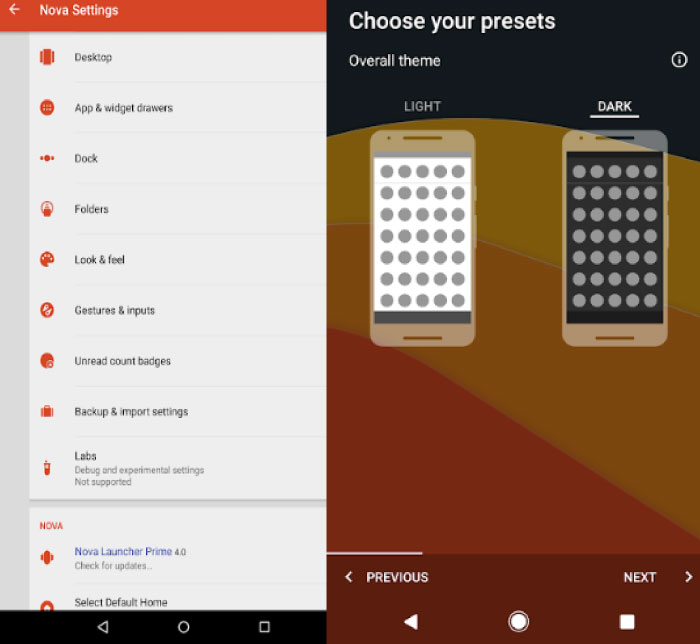
TeslaCoil Software revolutionalized Android customization by unveiling Nova Launcher, an app that is preferred by millions of users who want to give their phone a DIY makeover. It is a powerful launcher that lets the user be in control of their ship. This launcher is the most worthy to replace your old home screen layout. Nova Launcher supports all the latest models by all the manufacturers so its reach is vast. With customizable icon packs, dress your phone in the color of your emotions. Nova launcher is insanely fast, which gives your phone a smooth feel with the controlled animations.

With a recent update, you can now choose between a dark mode or the usual tone of your settings. Fear not, as all of these setups can be backed up with the inclusion of a backup-restore option without a need to install other apps. If you feel Nova Launcher is the one for you, wait till you try the premium version, which gives you hassle-free gesture inputs and an additional option of hiding your apps. If you want to completely renew your phone’s look and feel, download the king of launchers from the link below.

Main Features:


Custom Icon Themes.


Dark theme with Night mode.


Backup and Restore.


Customizable gestures.

Download Nova Launcher
2. Microsoft Launcher

Microsoft Launcher recently entered the market but has created quite a stir in terms of its visual appeal and how it makes your phone feel tailor-made. Previously titled Arrow launcher, Microsoft Launcher aims for perfection (Haha!) which strives to emulate your style with beguiling wallpapers, themes, icon packs, syncing and so on. As it is a Microsoft product, one can surely expect to open their recent activities on the Windows PC, which it does it seamlessly. We use our smartphones mainly to be in touch with people we care about and this app looks to magnify it by giving us a People tab (remember old Windows phone?) that you can pin to the home screen or place it in a folder. You can also customize your device by changing the usual – wallpapers, icon packs, etc.

With the help of Microsoft Launcher’s universal search bar, search anything from one place, be it the web, some files from your phone or even messages. If you want to see all your photos on your Windows PC, your PC should have the latest updates installed (Windows Fall Creator’s Update). Tired of using those on-screen buttons? You are not alone as Microsoft Launcher comes with gesture navigation that customizes the gestures deeply within your phone, which includes double tap to lock. If you are enticed already, download Microsoft Launcher and make your phone super fast.


Main Features:


People tab.


Cortana assistant.


PC continuity.


Universal search bar

Download Microsoft Launcher
3. GO Launcher

GO Launcher by GOMO Limited in an all-in-one launcher that is flooding with features. You would want to sit down and explore this launcher quite a bit as it is extensive. The launcher provides the user with a collection of more than 10,000 free themes along with Go Wallpaper that daily updates its collection of high-quality wallpapers with myriads of categories. This launcher lets users choose between 20 transition effects, because why not! The weather widget is one of the strongest suits of this launcher with Weather forecast widget, search widget, switches widget, and calendar widget.

You get to manage your apps by either hiding them or locking them from unauthorized people. Boost your phone’s memory by cleaning memory-clogging apps deleting cache and residual files. The DIY Live Wallpaper is a must for people who heavily customize their phones. Basically, create a wallpaper of your own liking by adding massive stickers, animations, and wallpapers. So, tap the download link below and download this fabulous launcher.


Main Features:


10,000+ free themes.


20+ animation effects.


App management.


Wallpapers.

Download GO Launcher
4. Evie Launcher

Evie Labs Inc has given us a clever solution for launcher problems – Evie Launchers. Termed deliciously different by the critics, which makes it stand apart. Akin to other launchers on this list, you get an embedded universal search which helps you search for your apps and files inside any app, some custom shortcuts like calling your best friend in no time, and folder grid customization. If you accidentally move your home screen icons, lock it instantly so that you don’t move them.

Evie Launcher is a simple customization app that gives you a less but useful set of options. So, try this app by downloading it via the link below.


Main Features:


Faster navigation.


Custom Shortcuts.


Home screen icons.


Personalization.

Download Evie Launcher
5. Apex Launcher

Apex Launcher is at the apex of all the launchers. This app has always been in the top 5 recommended list of launchers which makes it one of the few launchers. Personalize themes and icons with labels and shortcuts. You get a scrollable dock with up to 10 icons per page with creative transitions while scrolling through the home page. Hide your sensitive information in the apps by hiding them from the app drawer. Assuming that you want to prevent accidental changes to your home screen, then use locker which locks the apps on their place.

If you own a device which doesn’t support gesture navigations, rejoice as you get full support for gesture navigations. Who doesn’t mess up with their gadgets? We have all once in a lifetime, lost precious data because we didn’t perform a backup but Apex Launcher gives you that option in order to save you the frustration and disappointment. So, download this app and feel supreme.


Main Features:


Themes & Icon Pack Center.


Hide elements you don’t want.


Hide apps.


App Locker.


Backup and restore.

Download Apex Launcher
6. U Launcher Lite

U Launcher Lite is a snappy launcher for people who lead fast-paced lives. This launcher offers many of the usual features like a quick search which can be accessed with a lightning speed no matter which other apps are you in, a speed booster that frees up culprit apps clogging your memory, hiding apps that contain sensitive information (or sleazy chats!) and so on. You get a collection of 4K live wallpapers with multiple categories to choose from. Amongst this list, this is the only app that gives you the option of 3D themes, which gives your Android phone an iOS-like interface. The other notable feature of U Launcher Lite is the theme-maker, which lets you create everything – custom icon packs, live wallpapers among other things. So, tap the link below and download this launcher for a custom feel.


Main Features:


3D Themes.


Theme-Maker.


Super fast.


Hide apps.

Download U Launcher Lite
7. CM Launcher 3D

Cheetah Mobile Inc gives us a unique launcher, both in terms of usage and effects. After U Launcher Lite, CM Launcher gets 3D themes right as it mixes with your background and the feel of your phone. The theme store consists a staggering 10,000 and plus themes which are 3D and 2D in the category. The 2D icon packs are just beautiful which includes live wallpapers and contact themes which makes your phone look magnificent. Like other launchers in this list, you get the option of hiding your apps from spy. The launcher has a dedicated app sorting and phone boosting abilities that makes your phone more efficient to use. Apart from 3D themes, even the widgets and wallpapers get a 3D redesign which makes your phone stand out.

There’s one feature this launcher boasts off that no other launcher can do – VR Themes. Yes, you can now feel the new VR dynamic effects on screen. You can also play fun games with another theme tab – game themes. If all of these features still don’t sway you, choose the DIY theme tab which lets you make your own theme with minute customization. With the latest update, you can even choose to use Microsoft’s Cortana assistant to make your day easier. Download CM Launcher 3D to explore more of its feature.


Main Features:


10,000+ 2D/3D themes.


3D icon packs, effects.


VR Themes.


DIY Themes.


Lock/hide apps.

Download CM Launcher 3D
8. Google Now Launcher

Even though Android is Google’s brainchild, Google Now ranks no.8 on this list as it doesn’t have quite the slew of features other launchers have. But none the less, it is a fantastic launcher in itself. This is a super fast launcher that defines speed and probably other launchers should learn a lesson or two from its speed. Users get a Google Now cards tab from a simple right swipe from the home screen. If you are the kind of minimalist user who doesn’t like app shortcuts on the home screen, then there’s a quick search option which can be accessed from any home screen.

The Google regulars are also present, such as, “Ok Google” hotword, which triggers the Google Assistant to help you with your daily chores. App suggestions is a remarkable feature which accurately displays your most-used apps. Download Google Now launcher and explore the fast-paced world of Google.


Main Features:


Amazing gesture navigation.


App suggestion.


Quick search.

Download Google Now Launcher
9. Smart Launcher 5

Smart Launcher, as the name implies, is a brainy launcher focusing on the features that matter most to the users. It was a bit old-school in its previous iteration but has been refined since. If you already have a crazy collection of wallpapers, apply any favorite among them and witness the ambient theme – once any wallpaper is applied, this launcher automatically the theme color to harmonize the wallpaper. Crazy, right? There are more things Smart Launcher can do. You get adaptive icons that are not just customizable but can also be resized.

Use your phone with a one-handed mode where all the essential elements of the phone are moved to the bottom of the screen which makes it easier to use. If there are some apps that you want to keep away from prying eyes, hide such apps or lock it with a PIN so no one can open them without your consent. There are a lot of features in this launcher so download and explore Smart Launcher.


Main Features:


Adaptive icons.


One handed usage.


Gesture navigation.


Smart search.


Gestures and hotkeys.

Download Smart Launcher 5
10. ADW Launcher 2

After the success of the original ADW Launcher, AnderWeb released its successor, which promises to be better than the first version. The launcher assures for endless features so let’s dive in deep to see how ADW 2 is a worthy launcher. This app features a Dynamic UI coloring for wallpapers for a bright look, which now gives the user an option to change wallpapers by unlocking the desktop settings. For the gesture-loving peeps, you get to execute a second action on desktop shortcuts – just swipe up over the desktop shortcut to initiate the action. If a template is your thing, then rejoice as you can remove, add and share templates easily. There are tonnes of other impressive things this launcher can pull off so head to the Play Store and download it.


Main Features:


Dynamic UI.


Super fast transitions.


Internal & External themes.


Template manager.


Backup manager.

Download ADW Launcher 2
11. POCO Launcher

After unveiling the most pocket-friendly flagship, Xiaomi brought its most loved launcher – the POCO Launcher. This is a super light and fast launcher that gives other apps a run for their money. The design is something that can be gazed at, a whole day. You get a minimalist material design, which keeps your Home screen stylish yet functional. With recently introduced dark mode, it further adds to the aesthetics. The personalization is unparalleled when it comes to refining everything. Resize the layout and app icons, apply beautiful wallpapers, use custom themes and animations or use a third party icon pack.

The search option goes deep into the system which conveniently provides icon color categories, app suggestions. Other ways of customization include app management, categorically or custom groups. If you have some sensitive information in any app, you can just hide it by concealing its icons. As mentioned earlier, it is super fast. So, download POCO Launcher and feel the speed.


Main Features:


Intuitive design.


Dark mode.


Hide app icons.


Super fast & smooth.


Notification badge styles.

Download POCO Launcher

These were our recommended launchers for your Android phone. While we think Nova Launcher is insanely customizable, Microsoft and Apex Launcher are super smooth. You are spoilt of choices. So, which launcher will you pick? Or are you happy with your stock skin? Let us know in the comments below.


RELATED Must read:Youtube video downloader for pc

Also Read:sites Like PrimeWire

Also Read:KissAnime Alternative Websites

Gihosoft RePicvid Free Photo Recovery Software provides a free photo recovery software for windows to help users recover the deleted or lost photo for free.

Jihosoft Android Data Recovery: the best Android Data Recovery software for Windows and Mac to recover deleted contacts, messages, photos, videos, WhatsApp and etc from Android devices.Tips:How to transfer messages from iPhone to iPhone

Jihosoft File Recovery:Recover deleted, Lost, formatted, or corrupted files from PC, flash drive and memory card easily & safely

Also Read:Update Android

Also Read:Top 8 Best Alternative Websites to TamilGun in 2019

Also Read:Free Download FRP Bypass APK for Android 2019

Also Read:Best 10 Movie4k Alternative Websites for Movie Streaming 2019


Wednesday, April 17, 2019

Apple Hit With Securities Fraud Lawsuit for Hiding iPhone Sales Drop


Apple is facing a class action lawsuit accusing the company of securities fraud for making false statements and failing to disclose adverse information regarding its business prospects. These actions allegedly led to an artificially inflated stock price.


Specifically, the lawsuit claims that Apple was not initially forthcoming about a drop in demand for the iPhone due to poor sales in China and the 2018 battery replacement program, both of which contributed to lower than expected iPhone sales in the first fiscal quarter of 2019.


Apple is also accused of hiding the fact that production orders from suppliers had been slashed and prices had been cut, Apple's decision not to provide unit sales for iPhones and other hardware is also cited as a method Apple used to cause stock prices to rise to $209 per share.


When Apple did reveal the dip in iPhone sales and announced that it would not make its quarterly revenue forecast, Apple's stock fell $15 per share from $157.92 on January 2 to $142.19 per share on January 3. According to the lawsuit, Apple knew its iPhone sales weren't on track months before the information was shared.


The lawsuit, filed by the City of Roseville employees' retirement fund, is aiming to recover damages on behalf of people who purchased Apple stock between November 2, 2018 and January 2, 2019. Tim Cook and Luca Maestri are both named as defendants.


Update: A second law firm has filed a class action lawsuit against Apple, which is essentially identical to the first lawsuit. It also accuses Apple of securities fraud for concealing the iPhone's decline in sales.Sponsor ads:

Gihosoft Free iPhone Data Recovery:https://www.gihosoft.com/iphone-data-recovery-free.html

Gihosoft iPhone Data Recovery Free

Free iPhone Data Recovery Software for Windows/Mac

Recover up to 12+ types of files, including contacts, SMS, photos, WhatsApp, Viber, notes, etc.

Restore lost data from iOS devices directly or from iTunes and iCloud backup

Recover iPhone data lost due to iOS upgrade/jailbreak, accidental deletion, device lost or broken

Support all the latest iPhone, iPad and iPod Touch

Both Free and Pro version.

If you lost data after you updated to a new iPhone, you can always use Gihosoft iPhone Data Recovery to get the data back from the old iPhone or backup. You may also like:iphonerecovery.com

If you use android phones, please choose Gihosoft Android Data Recovery.With Gihosoft Android Data Recovery, no longer afraid of data loss!

Must read:Youtube video downloader for pc

Also Read:sites Like PrimeWire